
Table of Contents
Your compliance officer walks into a meeting and says, “We need to retain records for seven years.” Your architect nods. Your legal team assumes you will implement immutable records. Six months later, users are editing records. Deletion requests are creating chaos. Nobody knows if you are actually defensible in an audit.
Here is the uncomfortable truth. Most organizations deploy retention policies when they actually need retention labels with records management. And they do not realize the difference until it is too late.
The Core Tension That Decides Everything
Microsoft Purview offers two different retention approaches. They solve different problems.
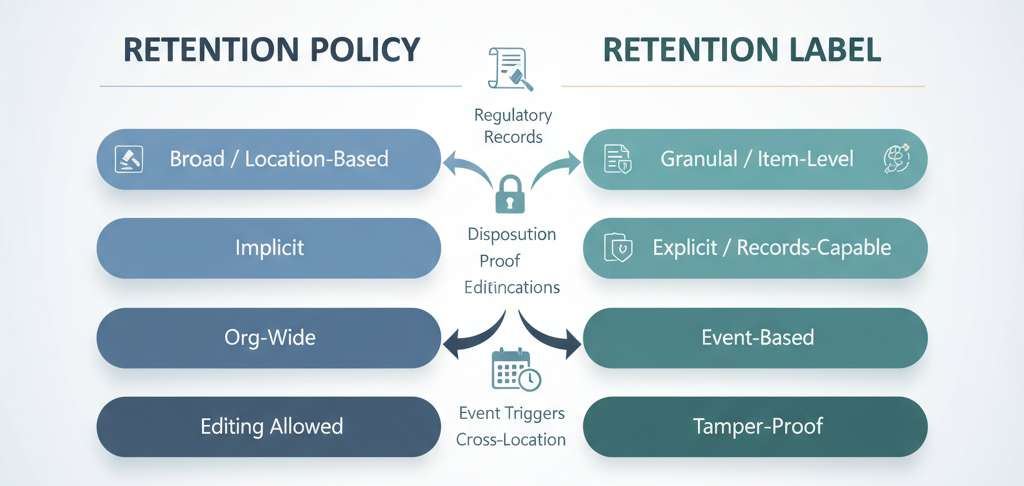
Retention policies are broad, location-based, and implicit. You point them at mailboxes or SharePoint sites, and content inside those containers gets retention rules. They work well for saying “keep all email for five years.”
Retention labels are granular, item-level, and explicit. You apply them to individual documents or emails. The rules travel with the content if it moves. Here is the critical part. Labels can declare items as records, which adds enforcement restrictions that policies simply cannot provide.
That distinction looks small on a product checklist. It decides whether your records are defensible under regulatory scrutiny.
What Records Management Really Means
Retention labels support three record states.
- Standard retention label: No special restrictions. Users and admins can edit, delete, and relabel. This just means “keep this until date X.”
- Locked record: Marked as a record. Users cannot edit or delete. Only admins can relabel. Once locked, the item stays locked unless an admin manually removes the record designation. This is immutability in practice.
- Regulatory record: The most restrictive option. Marked as a record and bound by regulatory requirements. Users cannot edit or delete. Even admins cannot relabel or remove the record designation during the retention period. This is the enforcement you need for financial records, healthcare documentation, and regulatory filings.
Retention policies offer none of this. They retain content silently in the background. Users keep working as if nothing happened. Deletion is prevented, but editing continues. For compliance purposes, that is not enough. Regulators often require proof that records were not tampered with.
The Trade-Off Matrix: What You Gain and Lose
| Capability | Retention Policy | Retention Label |
|---|---|---|
| Applies to locations (org-wide, efficient) | ✓ | ✗ (item-level only) |
| Persists if content moves within Microsoft 365 | ✗ | ✓ |
| Declare items as records (locked or regulatory) | ✗ | ✓ |
| Disposition review before permanent deletion | ✗ | ✓ (with proof audit trail) |
| Automatically applied based on sensitive info, keywords, classifiers | ✓ | ✓ |
| Start retention from event (e.g., contract expiry, employee departure) | ✗ | ✓ |
| Audit and track which records disposition | ✗ | ✓ (up to 7 years) |
| Admin-free user application | ✗ | ✓ (manual or auto-apply) |
The cost of using retention labels is operational complexity. You need a labeling strategy, user training (or auto-labeling intelligence), and a file plan to govern what labels do. If you are subject to regulatory record-keeping requirements, you do not have a choice.
The Precedence Rules When Conflicts Occur
Here is where most architects trip up. Organizations layer both retention policies and retention labels on the same content. What wins?
The hierarchy is stark and non-intuitive.
- Retention always beats deletion. An item marked for retention cannot be permanently deleted. A deletion policy does not override this.
- Longest retention period wins. If multiple policies or labels say retain for 5, 7, and 10 years, the item is retained for 10 years.
- Explicit beats implicit for deletion. A delete action from a retention label takes precedence over a delete action from a retention policy. The label is applied directly to the item rather than inherited from the container.
- Scoped policies override org-wide policies. If you have an org-wide policy and a scoped policy (say, for a specific mailbox or department), the scoped policy wins.
Example: A financial document falls under a policy that retains all SharePoint items for 10 years. It also has a label that specifies deletion after 7 years. Result: The document is retained for 10 years (longest retention wins), then permanently deleted at year 10 (label deletion takes precedence).
This matters. You cannot just “add” a policy and expect it to work cleanly. You need to map your entire retention setup. All policies, all labels, all scopes. That is the only way to know your actual retention outcome for any given piece of content.
Real-World Scenario: Financial Services
Your compliance team requires you to retain loan origination documents as immutable records for seven years (Sarbanes-Oxley). You must delete all email after five years for storage and risk reduction. Your legal team sometimes needs to override retention for active litigation.
The wrong approach: One org-wide retention policy deletes all email after five years. Another org-wide policy retains all SharePoint documents for seven years. Result: Loan documents are retained but still editable. You have no proof they were not modified. Regulators do not accept this. Audit fails.
The correct approach:
- Retention policy: Delete all email after five years. Broad, efficient, applied to all Exchange mailboxes.
- Retention label “SOX Loan Document”: Mark as locked record, retain 7 years. Auto-apply to SharePoint items matching a sensitive content classifier (say, “loan origination package”). Publish to the Finance team for manual application.
- Result: Loan documents cannot be edited or deleted. Admins cannot relabel them. Disposition review is required before permanent deletion. You have an immutable record with a defensible audit trail.
Cost: You need a labeling strategy, classifiers, and file plan governance. Your audit passes. Regulators are satisfied.
The Adaptive Scope Advantage You’re Probably Missing
Both retention policies and retention label policies now support adaptive scopes. These run as live queries instead of static lists. Instead of manually specifying 500 mailboxes, you can write a query: “All users with job title = Executive.”
This is powerful for regulatory scenarios because it scales without constant maintenance. When you hire a new executive, they automatically inherit the longer retention period. When you offshore a team, you can adjust their retention settings without policy rewrites.
Adaptive scopes work for both policies and labels. If you are still using static scopes (manual inclusion or exclusion lists), you are maintaining compliance by spreadsheet. That is expensive and error-prone.
The Hidden Cost: Records Management Requires Governance
Here is what vendors and consultants often gloss over. Records management is not a feature you turn on. It is a discipline you implement.
You need:
- A file plan that defines each record type, its retention period, and whether it locks.
- A labeling policy that decides what triggers auto-apply, which labels users apply manually, and how you handle ambiguous cases.
- User training on why records are locked and what to do when they encounter one.
- A disposition process. Who reviews records before deletion? What happens if business needs change mid-retention?
- An audit cadence. Quarterly or annual validation that your labels are applied correctly and records stay immutable.
Skip this governance, and your records are not actually records. They are just content with a label. Regulators know the difference.
Why This Decision Matters Now
Three forces converge.
- Regulatory tightening: SOX, GDPR, HIPAA, and industry-specific rules increasingly require proof of record immutability, not just retention.
- eDiscovery risk: Editable “records” become liability in litigation. Opposing counsel will ask why your records changed.
- Storage economics: Retention costs money. Unlocked records that stay editable often stay around longer than locked records. Nobody dares delete them. Locked records with clear disposition windows tend to be deleted on schedule.
Organizations that treat retention and records management as the same thing end up with expensive, non-compliant storage and legal exposure.
The Decision Framework
Ask these questions in order.
- Do any regulators require immutable records for this content? Yes, use retention labels with record locking. No, proceed to the next question.
- Does content need to move between locations and keep its retention rules? Yes, use retention labels. No, proceed to the next question.
- Do different items in the same location need different retention periods? Yes, use retention labels. No, proceed to the next question.
- Do you need disposition review or regulatory proof before deletion? Yes, use retention labels. No, use retention policies.
Answer “No” to all four questions, and a retention policy is your most efficient option. Answer “Yes” to any question, and you need retention labels. Assume you will want record locking.
Governance Without Paralysis
Do not let perfection block progress. Start with these steps.
- Immediate: A retention policy for email (delete after 5 years) and one for general documents (retain 3 years).
- Phase 2: A “Records” label for sensitive content (locked, 7 years) with auto-apply based on keywords or classifiers.
- Phase 3: Build out your full file plan with department-specific labels and disposition workflows.
Your architecture will evolve. Start with the right foundation. Understand the difference between implicit location-based retention and explicit item-level record management. You will not have to rebuild your compliance system in two years when auditors ask why your records are not actually locked.