
Table of Contents
You’ve deployed sensitivity labels across your organization. The policy is set. The labels are in place. Your security team has checked the box on “data classification complete.”
Then DLP silently fails. Conditional Access can’t enforce because a label never actually applied. Encrypted documents won’t open properly for co-authors. Your “mandatory” labeling creates exceptions that nobody tracks.
None of this shows up on a dashboard. There’s no error message. The whole system appears to be working.
This is the real cost of sensitivity labels done wrong not the deployment effort, but the false sense of security that comes after.
Why This Looks Simple (But Isn’t)
Sensitivity labels seem straightforward on the surface. Apply a label, set retention, enforce encryption, done. Microsoft’s UI doesn’t hide complexity, but the complexity hides itself in timing, platforms, and integration points.
The problem: every downstream security tool in Purview’s stack depends on labels being correct. DLP rules need them. Conditional Access policies need them. Encryption scopes need them. Copilot restrictions need them. When labels are misconfigured, the entire security architecture becomes unreliable.
And the failures are silent. Auto-labeling silently fails because auditing wasn’t enabled. Mandatory labeling conflicting with auto-labeling policies applies the wrong label without warning. Mobile clients don’t honor encryption settings. Trainable classifiers can’t be used for auto-labeling in the Data Map, but the documentation doesn’t emphasize this until you’re three months into a pilot.
The Trade-Off Nobody Mentions: Mandatory vs. Auto-Labeling
Start with the most common conflict: mandatory labeling and auto-labeling policies.
On the surface, these complement each other. Auto-labeling applies labels to content automatically. Mandatory labeling ensures users can’t save or send content without a label. Together, they should cover everything.
In practice, they conflict in ways the UI doesn’t warn you about.
When auto-labeling runs asynchronously (which it does in most scenarios), there’s a race condition. A user saves a file. Mandatory labeling triggers first, asking the user to choose a label. While the user is choosing, auto-labeling is running in the background. Now there are two labels trying to apply at once.
If the auto-labeling policy is configured to replace labels, and it conflicts with another auto-labeling policy configured to apply without replacing, the replacement wins but only in the simulation view. The actual conflict is resolved at runtime in ways that aren’t always predictable.
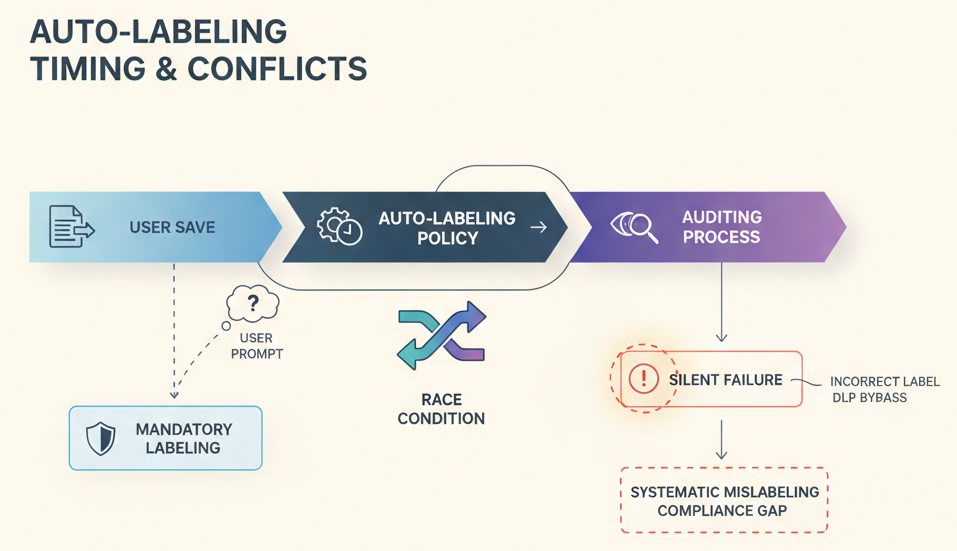
The fix isn’t complicated: sequence your policies, enable label auditing so you can see what’s actually applying, and test scenarios where timing matters. But none of that is enforced by default.
Why it matters: Users end up applying incorrect labels to bypass prompts. Then your DLP policies silently allow what they shouldn’t. Your compliance team later discovers the mislabeling was systematic, affecting thousands of documents.
The Platform Gaps: Why Your Labels Don’t Travel
You’ve rolled out Outlook, Word, Excel. Everyone’s got labels. Then someone on your sales team opens a file on their iPad and can’t see the sensitivity label controls.
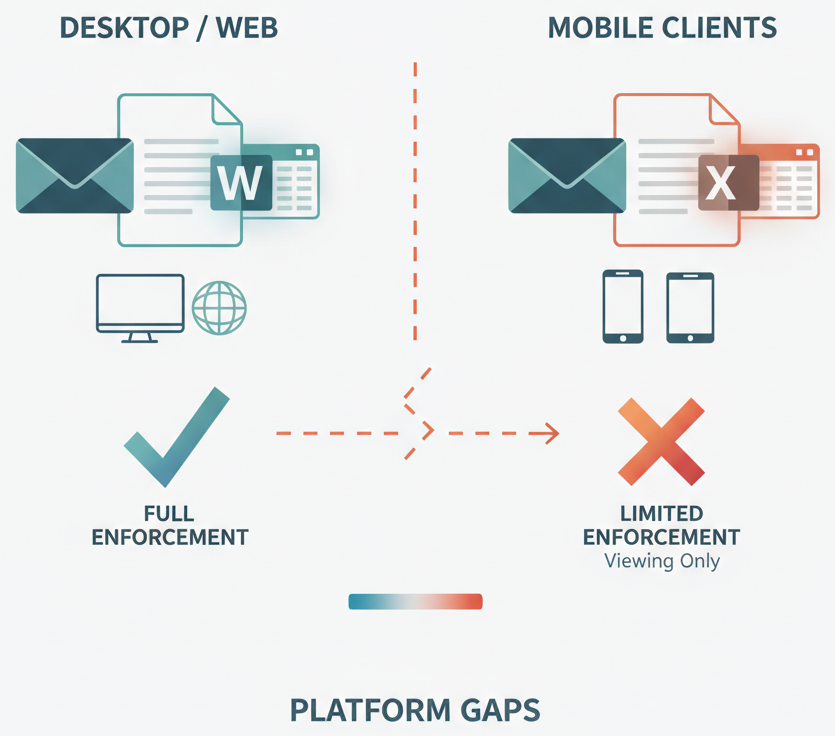
This isn’t a bug. It’s by design. Mobile clients have limited support for sensitivity labels. iOS and Android apps may support viewing labels, but not applying them. And encryption settings, especially double encryption may not work consistently across platforms.
This creates two problems. First, your enforcement strategy has gaps. Data can be modified on mobile without triggering labeling requirements. Second, users don’t understand why controls are inconsistent. They label a file in Outlook, hand off to someone on mobile, and the mobile user has no way to re-label or verify the label is still correct.
The Data Map adds another layer: trainable classifiers work beautifully in theory for auto-labeling. But they’re not supported for auto-labeling in the Data Map directly. You’d need to use simpler condition-based rules instead, which means you’re actually using hardcoded patterns (sensitive information types, keywords, file properties) rather than machine learning.
Why it matters: Your labeling strategy becomes fragmented by platform. Gaps in mobile enforcement create shadow copies of sensitive data that don’t get the protections you intended. And users lose trust in the system when controls disappear based on device.
Co-Authoring and Encryption: The Silent Breaker
Encrypt a document and try to share it for co-authoring.
The document is protected. Only authorized users can open it. That’s the point of encryption. But when you enable co-authoring, the encrypted document can’t be edited in real-time by multiple users without significant latency and sync problems.
This is a real constraint, not a configuration error. Encryption and real-time collaboration have fundamental conflicts. But the documentation doesn’t prioritize this tradeoff in the labeling configuration flow. Users discover it after deployment when their teams can’t collaborate on their most sensitive documents.
The workaround is to use co-authoring on the unencrypted version, then re-encrypt after collaboration. Or to use Azure Rights Management (ARM) with specific co-authoring permissions. Both work, but neither is intuitive.
Why it matters: Sensitivity labels solve encryption but break collaboration, or they optimize collaboration but reduce protection. Teams choose convenience and lower protection. Or they choose protection and watch adoption collapse because users can’t do their jobs.
The Timing Surprise: Auditing After the Fact
Auto-labeling policies run asynchronously. When you enable a new auto-labeling policy, it doesn’t immediately apply to existing content.
If auditing isn’t enabled from the start, you have no visibility into whether the policy is actually working. You’ll see labels appear on new documents. You won’t see whether policies are failing, conflicting, or silently skipped because of conditions that didn’t match.
By the time you enable auditing often months later when someone notices a compliance gap you’ve already got thousands of documents with inconsistent labeling. Now you’re reverse-engineering what went wrong.
The fix is simple but often skipped: enable auditing before deploying auto-labeling policies. Log everything. Then you’ll see failures immediately.
Why it matters: Without auditing, auto-labeling gives you the illusion of coverage without the actual coverage. Your compliance reports show labeled documents. The reality is far messier.
When Trainable Classifiers Aren’t Available
You want to use machine learning to automatically classify financial documents, customer contracts, and intellectual property. Trainable classifiers sound perfect.
They are for DLP and retention policies in Microsoft 365. But for auto-labeling in the Data Map? Trainable classifiers aren’t supported. You’re limited to sensitive information types (SITs), keywords, and document properties.
This matters because your SITs are built for data loss prevention, not data governance. They’re tuned to catch compliance violations, not to classify by business context. A financial document classifier would need business logic that SITs can’t express.
So you fall back to keywords and properties. And keywords have their own failure modes: they’re inflexible, they create false positives, and they don’t scale well across document types.
Why it matters: Your data governance strategy hits a wall. The classification fidelity you need isn’t available in the platform where you need it.
Real-World Scenario: The Healthcare Network That Lost Trust in Labels
A regional healthcare system rolled out sensitivity labels across 50,000 users. The security team configured mandatory labeling for all patient records, with auto-labeling policies for common document types.
Within two weeks, clinical staff were applying the “Confidential” label to everything, regardless of sensitivity, to bypass the mandatory prompt faster. Auto-labeling policies were failing on scanned PDFs because they only worked on structured data. Mobile nurses couldn’t see or apply labels at all on their iPad apps.
Six months later, auditing revealed that the label system had become a checkbox exercise. Documents labeled “Confidential” were treated identically, losing the fine-grained sensitivity distinctions the labels were supposed to provide. The system was in place. It was adopted. But it wasn’t working.
The real cost wasn’t the licenses or the configuration time. It was the erosion of security culture. When the tools don’t match reality, users stop trusting them.
The Architecture Thinking: Sensitivity Labels as Foundation, Not Endpoint
This is where the strategic insight matters most.
Sensitivity labels aren’t a standalone feature. They’re the foundational metadata layer for everything else in Purview’s data security stack. DLP rules need labels to know what to prevent. Conditional Access policies need labels to know when to restrict. Encryption scopes need labels to know what to protect. Copilot restrictions need labels to know what models can see.
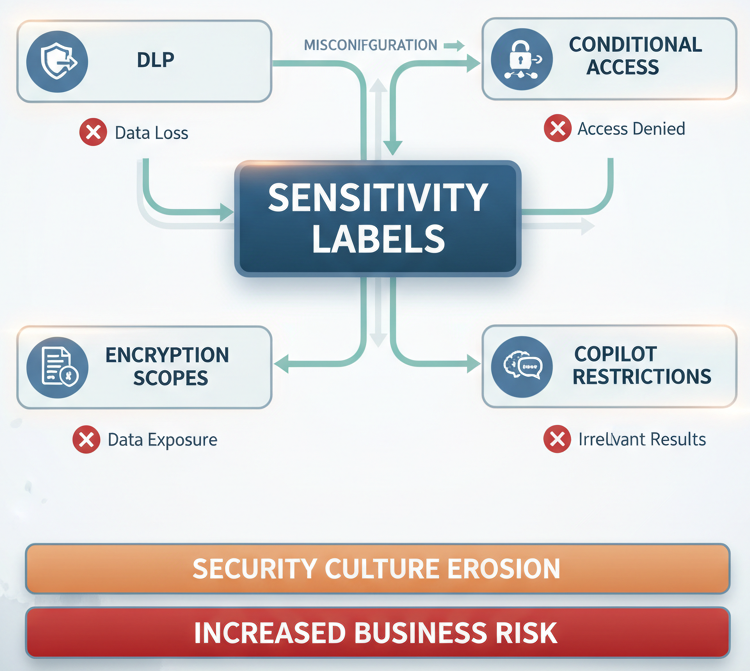
If labels are wrong, unreliable, or incomplete, the entire stack is compromised. You can’t fix it with better DLP rules or stricter Conditional Access. The problem is earlier.
This means label deployment isn’t a data governance project. It’s an architecture foundation decision. It affects DLP effectiveness, encryption strategy, mobile security posture, and eventually, Copilot access controls.
Treat it that way from the start. Model the failure modes. Test across platforms. Verify auto-labeling actually applies with auditing enabled. Don’t move to enforcement policies until you’re confident labels are working.
The Business Impact: Cost of Misalignment
The actual cost breaks down into three categories.
First, there’s the false confidence cost. You’ve deployed labels. Your compliance dashboard shows coverage. But the coverage is fragile. When something breaks a DLP exception, a co-authoring problem, an encryption failure looks like a tool limitation rather than a configuration error. You buy another tool instead of fixing the foundation.
Second, there’s the adoption cost. If labels don’t work consistently, or if they break workflows (like co-authoring), users will work around them. They’ll apply blanket labels, skip labeling, or maintain shadow systems. Rebuilding trust later is exponentially harder than getting it right initially.
Third, there’s the downstream enforcement cost. Every tool that depends on labels becomes less effective. DLP policies generate false negatives. Encryption doesn’t protect what you think it protects. Mobile devices operate outside your intended scope. Copilot restrictions can’t apply because labels are missing or wrong.
When This Works: The Prerequisites
Sensitivity labels work when a few non-negotiable conditions are met.
Your organization has a simple, clear labeling taxonomy. Not five levels of “Confidential.” Maybe three to four labels, each with a specific purpose. Complex taxonomies collapse under their own weight.
You’ve tested auto-labeling policies with auditing enabled before rollout. Not after. You’ve verified that labels apply correctly across platforms you actually use. Mobile, desktop, web, all of them.
You’ve made an explicit choice about co-authoring and encryption. You’ve decided what gets encrypted immediately (accepting the co-authoring tradeoff) and what gets encrypted later (accepting the timing gap). You’ve documented this as a security decision, not a technical limitation.
Your DLP, Conditional Access, and encryption scopes are aligned with your labeling strategy. These policies are configured in sequence, not independently. Each one assumes the labels from the previous step are correct.
The Decision: Speed or Stability
Here’s the hard part. Getting sensitivity labels right takes more time and coordination than the initial rollout suggests.
You can deploy labels in weeks. You can get them working reliably across your organization in months. The difference is whether you invest in testing, auditing, and alignment before enforcement, or whether you enforce first and debug after.
Most organizations choose speed. Deploy, enforce, troubleshoot. It’s faster initially. It’s also more expensive long-term because every downstream tool is less effective, and rebuilding user trust is hard.
The stable path is slower: design, test (with auditing), align downstream policies, then enforce. It takes longer upfront. It saves time and trust later.
The Final Take
Sensitivity labels are the foundation of Purview’s security model. But foundations can be built carelessly. And when they are, the entire structure is weaker than it appears.
The cost isn’t obvious until something breaks. Until DLP silently misses something. Until encrypted documents can’t be co-authored. Until mobile users work outside the system entirely. Until you discover that mandatory labeling has been systematically circumvented.
By then, fixing it requires touching the foundation again. And that’s expensive.
Deploy labels thoughtfully. Test across platforms. Enable auditing before auto-labeling goes live. Make explicit decisions about encryption and co-authoring. Align your DLP and Conditional Access policies. And measure whether the labels are actually being applied the way you designed them.
The time you invest upfront saves you from the false confidence of a system that looks secure but isn’t.