
Table of Contents
Most Data Loss Prevention (DLP) programs apply the same rules to every employee. In practice, that means someone who accidentally shares a file may be treated the same as someone deliberately exporting sensitive data. That approach may appear consistent, but it often creates unnecessary friction without effectively addressing real risk.
Many organizations have spent years refining DLP policies that block, warn, or restrict actions based on content patterns. These controls do identify issues, but they also tend to generate high volumes of alerts. Over time, security teams can become desensitized, users look for workarounds, and genuinely risky behavior can be harder to spot amid the noise.
Microsoft Purview’s Adaptive Protection introduces a different model. Instead of applying static rules uniformly, it adjusts enforcement dynamically based on user risk signals. This can mean stricter controls where risk is higher and fewer interruptions for the majority of users. Here’s why that shift matters.
The Challenge with One-Size-Fits-All Policies
Traditional DLP assumes risk is evenly distributed across an organization. In reality, risk is often concentrated within a small subset of users at any given time.
Because static policies cannot distinguish between different risk levels, organizations are forced into a trade-off. Policies can be relaxed to reduce user friction or tightened to increase protection often at the cost of productivity. This frequently results in a cycle of tightening controls after incidents, followed by loosening them in response to user feedback.
The broader impact is not just operational inefficiency, but also reduced trust in security controls when they feel misaligned with real-world behavior.
What Adaptive Protection Changes??
Adaptive Protection connects Insider Risk Management (IRM) with DLP and related controls.
Instead of focusing only on what content is being accessed or shared, policies also consider who is performing the action and their current risk profile.
Microsoft Purview’s Insider Risk Management evaluates behavioral signals such as file activity, sharing patterns, email usage, and cloud interactions. It can also incorporate newer signals, including interactions with AI tools like Microsoft 365 Copilot. Based on these signals, users are assigned dynamic risk levels such as Minor, Moderate, or Elevated. These risk levels can then influence DLP policies, Conditional Access rules, and data lifecycle controls. For example, a low-risk user might receive a reminder when sharing externally, while the same action from a higher-risk user could trigger stronger restrictions or alerts.
This represents a shift from static enforcement to context-aware, adaptive controls.
The Architecture Behind Dynamic Risk Enforcement
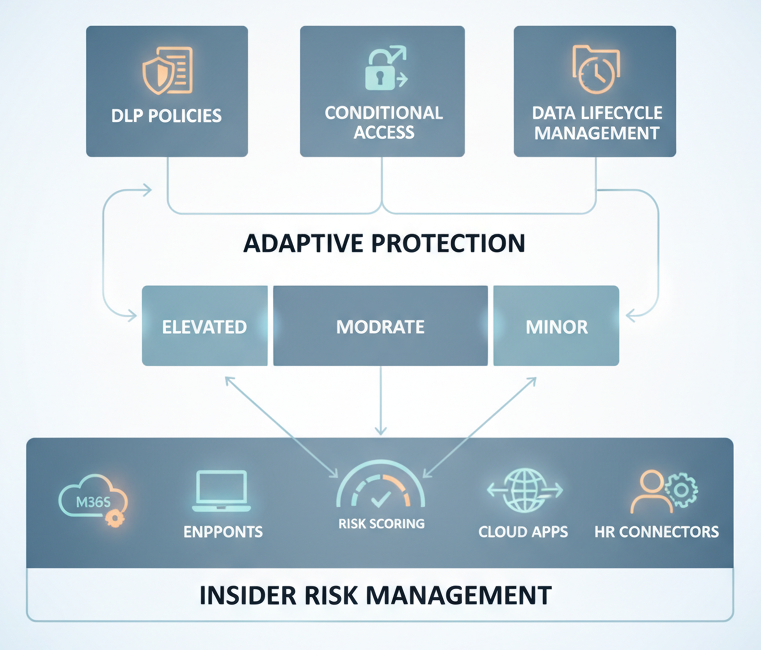
The overall flow can be summarized as:
Signal Collection → Risk Scoring → Policy Adjustment → Enforcement → Feedback
Insider Risk Management ingests signals from services such as Exchange, SharePoint, OneDrive, Teams, endpoints, and connected cloud applications. It uses built-in policy templates to identify scenarios such as data exfiltration, policy violations, and risky behavior, including emerging patterns related to AI usage.
Importantly, the system evaluates sequences of activity, not just isolated events. For example, patterns like data collection followed by external sharing may indicate higher risk than a single action. It can also detect gradual data movement designed to avoid traditional alert thresholds.
Risk levels are dynamic and can change as user behavior evolves, allowing controls to adjust accordingly.
Where Conditional Access Comes In??
While often viewed as a DLP enhancement, Adaptive Protection also integrates with Conditional Access.
When a user’s risk level increases, organizations can automatically apply additional controls such as requiring stronger authentication, limiting access to sensitive applications, restricting downloads, or enforcing device compliance.
This creates a graduated response model, where controls scale based on risk rather than relying on a simple allow-or-block approach.
The 120-Day Retention Capability
Another capability is the ability to apply targeted retention policies for higher-risk users. When a user reaches an elevated risk level, organizations can configure policies to preserve content they modify or delete for a defined period, such as 120 days.
This helps maintain visibility into activity even if data is removed, which can support investigations and compliance requirements. Because it is applied selectively, it avoids the overhead and privacy concerns of applying broad retention to all users.
Quick Setup vs. Custom Configuration
Organizations can deploy Adaptive Protection using either Quick Setup or a more customized approach.
Quick Setup provides preconfigured policies and allows teams to get started quickly. This is useful for pilots or organizations beginning to explore insider risk capabilities.
Custom configuration allows for more granular control, including defining risk thresholds, mapping specific policies to risk levels, and tuning enforcement actions.
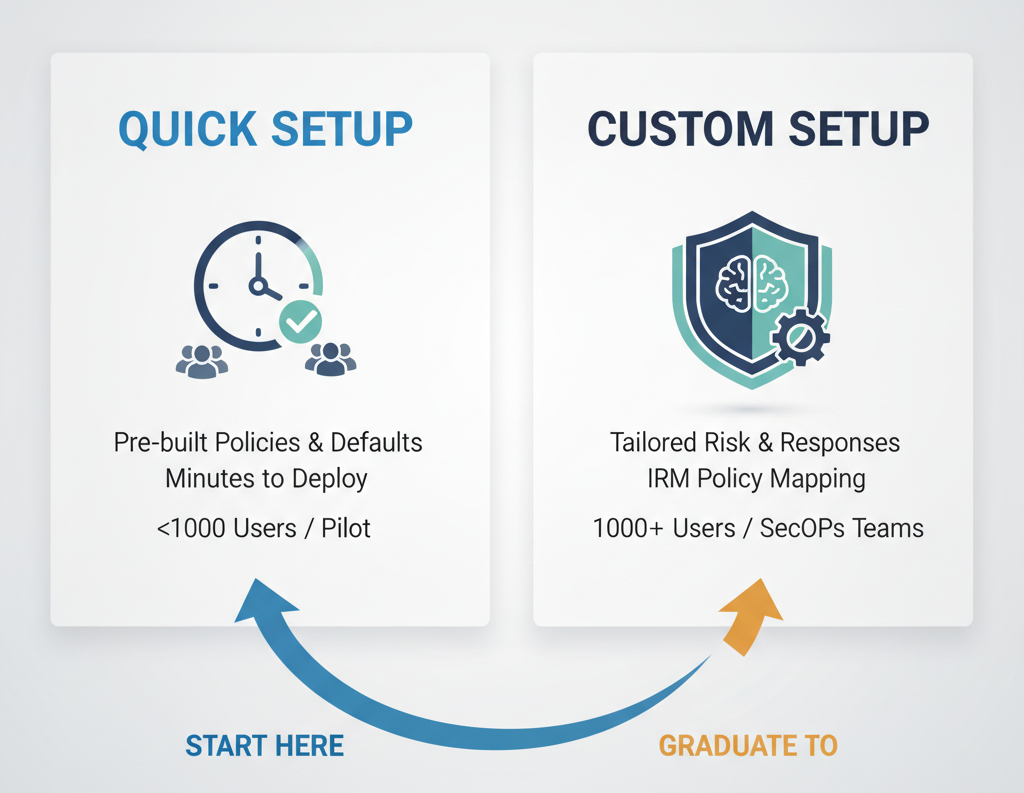
A common approach is to start with Quick Setup to establish a baseline, then refine policies over time as more is learned about user behavior and risk patterns.
Key Considerations
Adaptive Protection introduces several important considerations.
Privacy and transparency are critical, as behavioral analysis requires appropriate governance and communication with stakeholders such as HR and legal teams.
Insider Risk Management policies may require tuning to reduce false positives, particularly in roles with high data activity.
Licensing requirements can be more advanced than standard DLP, often requiring higher-tier Microsoft 365 plans.
Finally, organizations should define clear boundaries to ensure the capability is used for security purposes and not extended into unrelated areas.
When It’s a Good Fit
Adaptive Protection is particularly valuable when organizations are dealing with high alert volumes, widespread access to sensitive data, or increasing data exposure through collaboration and AI tools.
It may be less effective if foundational elements such as data classification and labeling are not yet in place.
A Practical Example
Consider a mid-sized organization with several thousand employees and a high volume of DLP alerts. Traditional policies may generate more alerts than the security team can realistically investigate.
By introducing Adaptive Protection and observing behavior over time, the organization may find that a relatively small percentage of users account for the majority of risk signals.
With a tiered response model, stricter controls can be applied to higher-risk users while maintaining a smoother experience for the broader workforce. This can reduce alert volume and improve the relevance of security signals.
Final Thoughts
Static DLP remains an important foundation, but it has limitations when applied uniformly at scale.
Adaptive Protection represents a shift toward aligning controls with actual user behavior and risk levels. When implemented thoughtfully with appropriate governance, tuning, and stakeholder alignment, it can help organizations focus on meaningful risks while minimizing unnecessary disruption.
The key is to approach it not just as a feature, but as an evolving capability that improves over time.