
Table of Contents
Somewhere in your tenant right now, Microsoft 365 Copilot is doing exactly what you paid it to do for pulling together information from SharePoint, email, Teams, and OneDrive to give a user a crisp, well-organized answer.
The problem? That answer just aggregated salary data from an HR site, draft M&A terms from a legal folder, and client financials from a project no one remembered to lock down. The user who got it all? A marketing coordinator with overly broad SharePoint permissions that nobody ever bothered to revoke.
She didn’t break any rules. She didn’t bypass a single control. Microsoft 365 Copilot simply searched everything she could technically access, and it turns out, that was everything.
This is the AI data security crisis hiding in plain sight. And Microsoft Purview is the only integrated stack that can address it across all four layers where it actually matters.
Copilot Didn’t Create Your Problem: It Just Made It Impossible to Ignore
Let’s start with an uncomfortable truth: most enterprises have had a data oversharing problem for years. SharePoint sites with “everyone except external users” permissions. OneDrive folders shared via “anyone” links. Stale project sites from three reorganizations ago with access lists that never got cleaned up.
Before generative AI, this was a slow-burn risk. A user would need to know a document existed, navigate to the right library, and open the right file. The friction of manual discovery was your de facto access control and for years, it worked well enough.
Copilot removed that friction overnight.
When a user prompts M365 Copilot, it runs against every piece of content that user has permissions to access. It doesn’t just retrieve one file. It synthesizes across dozens of sources simultaneously. The permissions model you could afford to be sloppy about when access was manual becomes a catastrophic liability when a large language model starts aggregating at machine speed.
Microsoft’s own deployment blueprint for securing Copilot agents acknowledges this directly: if grounding data and agent interactions aren’t secured, the result is access beyond what users need for their role, unauthorized disclosure of confidential information, and responses surfacing stale or irrelevant data. That’s not a theoretical scenario. It’s what’s happening in thousands of tenants today.
Why Your Existing DLP Doesn’t Catch This
Here’s where most security teams get this wrong. They assume their existing DLP policies cover AI-generated content. They don’t and the reason is architectural, not configurational.
Traditional DLP was designed to intercept data at movement boundaries: email attachments leaving the organization, files uploaded to cloud storage, sensitive content pasted into a browser. It monitors the perimeter.
But Copilot doesn’t move data across a perimeter. It surfaces data within the same Microsoft 365 environment, inside a conversation that lives in the user’s own mailbox. Your endpoint DLP won’t flag a Copilot response that summarizes a “Highly Confidential” document into a Teams chat. Your email DLP won’t trigger because no email was sent. Your Cloud Access Security Broker wasn’t designed to inspect first-party AI-generated text inside Microsoft’s own apps.
There’s a second blind spot that’s even less obvious. Copilot honors sensitivity labels but only if those labels use encryption, and only if the encryption configuration includes the EXTRACT usage right. If a label applies encryption where users are granted VIEW but not EXTRACT, Copilot won’t return the data. But if your label applies the “Editor” permission level which includes EXTRACT by default Copilot will happily summarize it.
Most organizations haven’t audited their label encryption configurations with AI access patterns in mind. They set up permission levels for human document collaboration. Now those same settings determine what a large language model can aggregate. The gap between “who can read this document” and “what AI can synthesize from this document” is where the real risk lives.
The Four-Layer Architecture Most Teams Are Missing
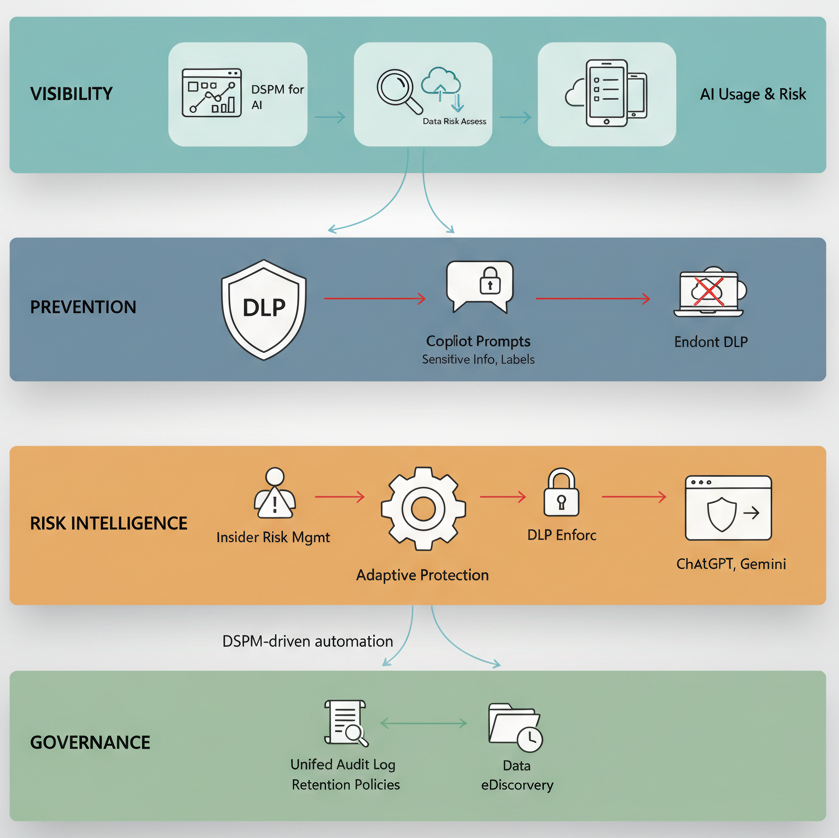
Microsoft hasn’t just added AI monitoring to existing tools. They’ve constructed a coordinated defense model across four distinct layers, and understanding how these layers interact is what separates organizations that are genuinely protected from those that just think they are.
Layer 1 – Visibility: DSPM for AI
Data Security Posture Management for AI is your front door. It’s the unified dashboard that shows you how AI is actually being used across Microsoft 365 Copilot, Copilot agents, Copilot in Fabric, Security Copilot, and even third-party AI tools like ChatGPT, Google Gemini, and DeepSeek (when devices are onboarded and the browser extension is installed).
The capability that matters most here is the data risk assessment. DSPM automatically runs a weekly assessment against your top 100 SharePoint sites based on usage, identifying overshared content, “anyone” sharing links, and sensitive information types that Copilot could surface to the wrong users. Each flagged site gets a flyout with four tabs – Overview, Identify, Protect, and Monitor giving you a direct path from discovery to remediation.
The Protect tab is where it gets actionable. For each flagged site, you can restrict access by label (creating a DLP policy that prevents Copilot from processing labeled content), restrict all items via SharePoint Restricted Content Discovery, create auto-labeling policies for unlabeled sensitive files, or create retention policies to delete stale content that hasn’t been accessed in three years.
Here’s the part most teams skip: DSPM also surfaces an Apps and Agents report that shows which AI agents are active in your organization, their risk levels as determined by Insider Risk Management, and the specific risky activities, oversharing, exfiltration, unethical behavior observed in their interactions. If you’re deploying Copilot Studio agents that ground on SharePoint and Dataverse, this report is your first line of defense.
Layer 2 – Prevention: DLP for the Copilot Location
This is the enforcement layer, and it works through two fundamentally different mechanisms that can’t be combined in the same rule a constraint that trips up almost every team on first deployment.
The first mechanism blocks sensitive information types in prompts. Create a DLP policy targeting the “Microsoft 365 Copilot and Copilot Chat” location with a “Content contains > Sensitive information types” condition. When a user types a credit card number, national ID, or any custom SIT into a Copilot prompt, DLP intercepts it in real time. Copilot doesn’t respond. The prompt isn’t used for internal or external web searches. It’s completely dead.
The second mechanism blocks files and emails with specific sensitivity labels from being processed in Copilot responses. Set the condition to “Content contains > Sensitivity labels” and select your most restrictive labels. Copilot will exclude those items from response summarization entirely though they might still appear in citations. This is generally available, covers files stored in SharePoint Online and OneDrive for Business, and extends to emails sent on or after January 2025.
The critical design constraint: you can’t combine SIT-based prompt blocking and label-based response filtering in the same rule. You need separate rules in the same policy, or separate policies. This matters for policy architecture teams that try to put everything into one rule hit a wall immediately.
There’s also a default DLP policy that Microsoft now auto-creates a Default DLP policy – Protect sensitive M365 Copilot interactions configured in simulation mode with policy tips shown. It detects SITs in prompts but won’t block anything until you switch it to enforcement mode. Most organizations don’t even know it exists.
Layer 3 – Risk Intelligence: Adaptive Protection + Insider Risk
This is where Purview’s AI security model becomes genuinely differentiated from anything else in the market. Insider Risk Management now includes a “Risky AI usage” policy template that detects suspicious patterns in how users interact with AI tools including prompt injection attacks, accessing protected materials, and anomalous aggregation patterns. But the power isn’t in detection alone. It’s in what happens next.
Adaptive Protection dynamically assigns DLP policies, Conditional Access policies, and data lifecycle management actions based on real-time insider risk levels Elevated, Moderate, and Minor. The enforcement is proportional and automatic:
An employee flagged at “Elevated” risk gets blocked from Office 365 apps entirely, or blocked from accessing labeled SharePoint sites (which also prevents Copilot from grounding on those sites), or blocked from downloading from cloud applications. A “Moderate” risk user gets a Terms of Use acknowledgment requirement at sign-in. A “Minor” risk user gets logged in report-only mode.
The lifecycle management layer automatically preserves any SharePoint, OneDrive, or Exchange content deleted by elevated-risk users for 120 days preventing evidence destruction during an active risk window.
And because Adaptive Protection creates this automatically from DSPM’s one-click policies, you can go from zero to dynamic enforcement in under an hour. The caveat: it takes up to 72 hours for analytics, policies, and risk level assignments to fully propagate.
Layer 4 – Governance: Retention, eDiscovery, and Audit
Every Copilot interaction, every prompt, every response is captured in the unified audit log and stored in the user’s mailbox. These interactions are subject to retention policies, eDiscovery holds, and compliance searches using the ItemClass property.
For third-party AI tools (ChatGPT, Gemini, DeepSeek), retention is supported through the “Other AI apps” location in retention policies but only for interactions through Edge with collection policies configured to capture content.
This is the layer that legal teams don’t think about until litigation arrives. Every Copilot interaction is a discoverable record. If your legal team needs to review what an employee asked Copilot during a specific period or what a Copilot agent surfaced from a specific SharePoint site that data is searchable. If you haven’t configured retention for the Copilot location, you’re either over-retaining everything (cost and risk) or under-retaining (compliance violations waiting to happen).
The Shadow AI Problem Inside the Copilot Problem
Here’s the part most Copilot-focused conversations miss entirely. While you’re worrying about what M365 Copilot can access internally, your users are also pasting sensitive data into ChatGPT, Claude, Gemini, and DeepSeek from their browsers.
Purview now addresses shadow AI across three enforcement surfaces:
Browser Data Security in Microsoft Edge inspects text that users type or paste into AI application prompts in real time. If someone tries to paste bank account numbers into ChatGPT through Edge, DLP blocks the action before it leaves the browser. This covers ChatGPT (consumer), Microsoft Copilot (consumer version), DeepSeek, and Google Gemini.
Network Data Security extends protection beyond Edge to all network-level traffic covering non-Microsoft browsers, desktop apps, APIs, and add-ins. It integrates with SASE/SSE solutions to identify, block, and alert on sensitive content shared with generative AI, unsanctioned cloud storage, and cloud email providers. This is the only way to catch data flowing to AI through Chrome, Firefox, or desktop applications.
Endpoint DLP handles the device layer blocking paste to browser, file upload to cloud services, and copy to clipboard for AI application websites across Windows and macOS.
DSPM for AI ties all three together with one-click policies: “Block sensitive info from AI sites” uses Adaptive Protection to give block-with-override to elevated-risk users, “Block elevated risk users from submitting prompts to AI apps in Edge” blocks across risk tiers, and “Block sensitive info from AI apps in Edge” detects common SITs inline. If you’re only securing M365 Copilot and ignoring shadow AI, you’re locking the front door while the back wall is missing.
What This Actually Costs (And Where Budget Conversations Go Wrong)
Let’s be direct about the financial reality.
DLP for prompts blocking SITs in Copilot prompts is available to all M365 Copilot users. No additional licensing. This is the one control every organization should enable immediately.
DLP for response filtering blocking labeled files from Copilot processing requires E5/A5 or the Microsoft Purview suite add-on. Same for Insider Risk Management, Adaptive Protection, Communication Compliance, and the full DSPM capabilities.
The gap between “available to all Copilot users” and “requires E5” is where most budget conversations stall. Organizations on E3 can block sensitive prompts but can’t prevent Copilot from processing labeled files, can’t detect risky AI usage patterns, and can’t dynamically adjust enforcement based on user risk. They get a lock on the prompt, but the response is wide open.
The real cost isn’t licensing, it’s the organizational attention required to deploy sensitivity labels at scale. Everything in Purview’s AI security stack depends on labels. DLP response filtering is useless without them. Adaptive Protection is blind without them. DSPM data risk assessments identify unlabeled sensitive content, but someone still has to label it. Auto-labeling policies help, but they require tuning, testing in simulation mode, and ongoing refinement.
Every day that Copilot runs without these controls configured is a day your organization generates discoverable evidence that sensitive data was accessible to unauthorized users. If a regulator asks whether you knew about the oversharing risk and what you did about it, “we were planning to configure Purview” is not a defense.
The Trade-Offs Nobody Mentions
DLP can’t scan files uploaded directly into Copilot prompts. If a user uploads a file into a Copilot prompt, DLP evaluates only the text they typed not the file contents. This is a documented limitation. Your prompt-level protection has a blind spot around file attachments.
Policy propagation isn’t instant. DLP policy updates take up to four hours to reflect in the Copilot experience. Sensitivity label changes, auto-labeling policies, and Insider Risk configurations each have their own propagation timelines. Don’t expect real-time enforcement after policy changes.
Sensitivity label inheritance is powerful but inconsistent. When Copilot generates new content from labeled sources, it inherits the highest-priority sensitivity label, but only when supported by the specific Copilot experience. In Copilot Chat, the response displays the highest-priority label from referenced data. In Word, a new document inherits the label from the source files. But not every Copilot surface supports inheritance identically, and user-defined permissions can block Copilot entirely.
Third-party AI monitoring requires infrastructure. DSPM for AI monitors ChatGPT, Gemini, and DeepSeek, but only through Edge (for browser data security) or through SASE integration (for network data security). Unmanaged devices, non-Edge browsers without network-layer protection, and mobile devices are visibility gaps.
One-click policies are starting points, not destinations. DSPM’s one-click policies create default Insider Risk, DLP, and Communication Compliance configurations with broad scope and generic thresholds. They’re excellent for day-one visibility. They’re insufficient for mature protection. Every one-click policy should be reviewed, scoped, and tuned within 30 days of activation.
When This Makes Sense (And When You’re Not Ready)
This is the right architecture if you’re deploying Microsoft 365 Copilot or Copilot agents at scale, have E5 licensing (or are willing to get there), and have at least a baseline sensitivity label taxonomy deployed. The four-layer model; visibility, prevention, risk intelligence, governance is the most comprehensive AI data security approach available in the Microsoft ecosystem.
You’re not ready if your SharePoint permissions are chaotic and you lack the organizational will to fix them. No amount of Purview policy can protect data that’s universally accessible. Running DSPM data risk assessments without a remediation plan creates anxiety without progress.
You’re also not ready if sensitivity labels aren’t deployed beyond a pilot. DLP for Copilot without labels is like installing an alarm system in a house with no doors. The technology works but only when the foundation is in place.
A Financial Services Firm That Got the Sequencing Right
Consider a mid-size financial services firm 8,000 employees, E5 licensed, deploying M365 Copilot across advisory and operations teams.
Before broad enablement, their CISO runs the DSPM data risk assessment. Results surface 34 SharePoint sites with “anyone” sharing links containing client financial data, a dozen project sites where former team members still have access, and hundreds of unlabeled documents containing SSNs and account numbers.
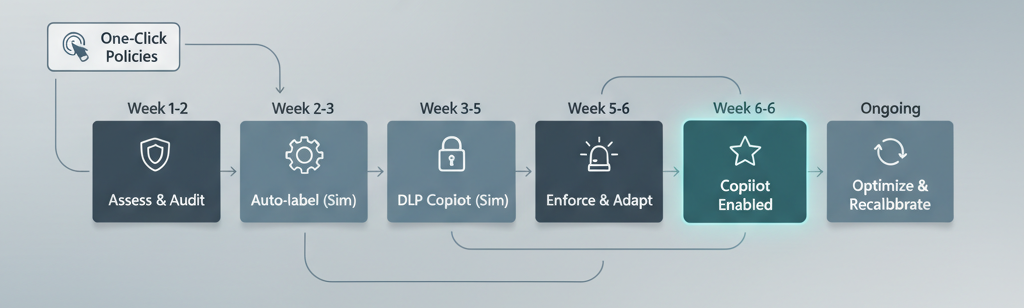
They take a staged approach aligned with Microsoft’s own four-step agent security blueprint.
Week 1–2: Enable auditing, run the default and custom data risk assessments, apply SharePoint Restricted Content Discovery to the highest-risk sites immediately removing them from Copilot’s reach without touching permissions.
Week 2–3: Deploy auto-labeling policies for financial SITs (account numbers, credit card numbers, SSNs) targeting SharePoint and OneDrive. Run in simulation mode. Review matches in the labeling activity explorer.
Week 3–5: Create DLP policies for the “Microsoft 365 Copilot and Copilot Chat” location one rule blocking prompts containing financial SITs, another preventing Copilot from processing documents labeled “Highly Confidential” or “Client Confidential.” Both run in simulation mode. The SIT-based rule generates significant false positives from industry-standard document formats they refine the SIT definitions and add exceptions.
Week 5–6: Switch DLP policies to enforcement. Enable the “Risky AI usage” Insider Risk template through DSPM’s one-click policy. Configure Adaptive Protection with Conditional Access elevated-risk users blocked from labeled SharePoint sites, moderate-risk users prompted with Terms of Use. Enable the Browser Data Security policies to block paste of financial SITs into ChatGPT and Gemini through Edge.
Week 6+: Broad Copilot enablement. Weekly DSPM data risk assessments run automatically. DLP alerts reviewed daily. Insider Risk baselines recalibrated monthly as AI usage patterns evolve.
The entire process takes six weeks. Not because the technology is hard DSPM’s one-click policies can be activated in minutes but because the organizational work of cleaning up permissions, deploying labels, and testing policies requires discipline. The firms that rush this are the ones that end up with policies so aggressive they kill Copilot adoption, or so permissive they provide nothing but compliance theater.
The Decision That Actually Matters
Here’s what this comes down to: Microsoft built Copilot to maximize information retrieval surface everything a user can technically access, synthesize it, and deliver it fast. Microsoft also built Purview to restrict what Copilot can process, who can interact with what, and how risk-level signals dynamically adjust enforcement.
These are two products with opposing design philosophies living under the same roof. One maximizes access. The other constrains it. Your job as a decision-maker is to calibrate the tension between them.
The organizations that get this right treat AI data security as an operating discipline, not a project. DSPM data risk assessments running weekly. DLP policies tuned continuously. Insider Risk baselines recalibrated as usage patterns evolve. Sensitivity labels maintained as a living taxonomy.
The organizations that get this wrong check the box enable the one-click policies from DSPM, congratulate themselves, and move on. Those policies are excellent scaffolding. They are not the building.
If you take one action after reading this: sign into the Microsoft Purview portal, navigate to DSPM for AI, and look at the data risk assessment for your most active SharePoint sites. Don’t configure anything yet. Just look at what comes back.
If the results don’t concern you, you’re either exceptionally well-governed or you’re not looking closely enough.
The oversharing was always there. Copilot just made it searchable.