
Table of Contents
Why Your Power BI Copilot Isn’t Working (And It’s Not the AI)
If Copilot feels unreliable in your Power BI reports, the problem probably isn’t the AI, it’s your semantic model. Most organizations expect Copilot to “just work” out of the box. When it doesn’t, when answers are vague, inconsistent, or flat-out wrong, the instinct is to question the AI. But in reality, Copilot is only as good as the context you give it and, in most cases, that context is missing.
The Real Problem: Your Data Isn’t Ready for AI
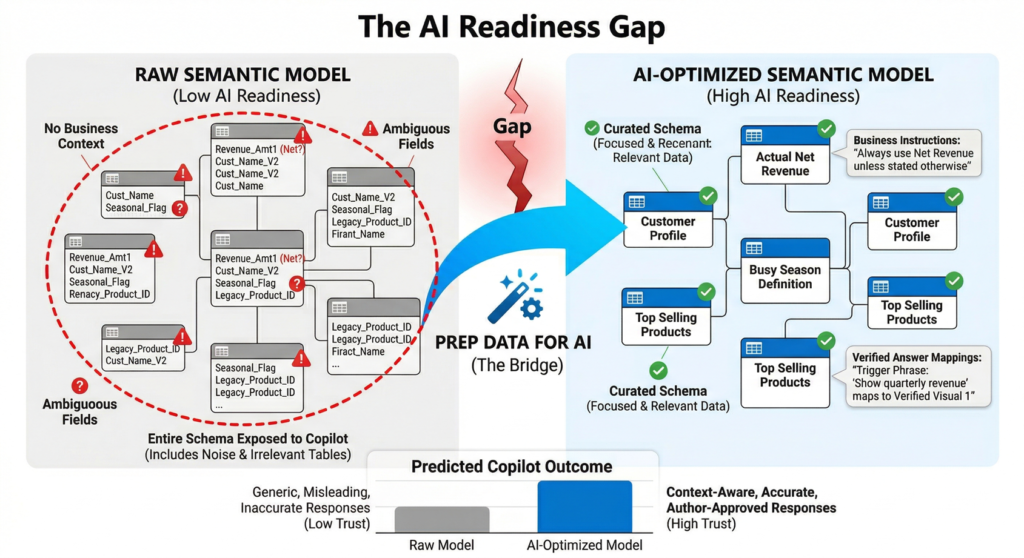
Most organizations deploying Power BI Copilot encounter a common frustration: the AI produces generic, inaccurate, or irrelevant responses. End users lose trust quickly, and adoption stalls. The root cause is rarely the AI model itself. Instead, it is the gap between raw data and the business context that Copilot needs to deliver meaningful answers.
Consider what happens when Copilot encounters a semantic model without preparation:
- Ambiguous column names lead to misinterpreted queries (e.g., “Revenue” could mean gross, net, or adjusted revenue).
- Business-specific terminology like “busy season” or “top sellers” has no grounding in the data model.
- Copilot reasons over the entire schema, including irrelevant or confusing tables, which dilutes response quality.
- There is no mechanism to guarantee that frequently asked executive questions return validated, accurate visuals.
| The core issue is not an AI problem. It is a data readiness problem. Without explicit business context embedded into the semantic model, Copilot operates in the dark. |
Solution Overview: The Microsoft Stack
Microsoft has introduced a unified “Prep data for AI” experience within both Power BI Desktop and the Power BI service. This feature set gives semantic model authors three core capabilities to bridge the gap between raw data and Copilot-ready intelligence:
| Feature | What It Does | Business Value |
| AI Data Schema | Curate which fields Copilot can reason over, removing noise and ambiguity from the schema. | Reduces hallucination risk; ensures Copilot focuses on trusted, relevant data only. |
| AI Instructions | Provide natural-language business context, terminology definitions, and analysis rules directly on the semantic model. | Aligns Copilot with your organization’s language, KPIs, and analytical priorities. |
| Verified Answers | Map specific trigger phrases to pre-validated visuals, ensuring certain questions always return accurate, author-approved answers. | Builds executive trust; guarantees consistency for high-stakes queries like quarterly revenue or margin analysis. |
All these features are saved at the semantic model level, not the report level. This means any report built on a prepared model automatically benefits from the AI enhancements, and changes propagate across the organization as models are shared.
Architecture Approach
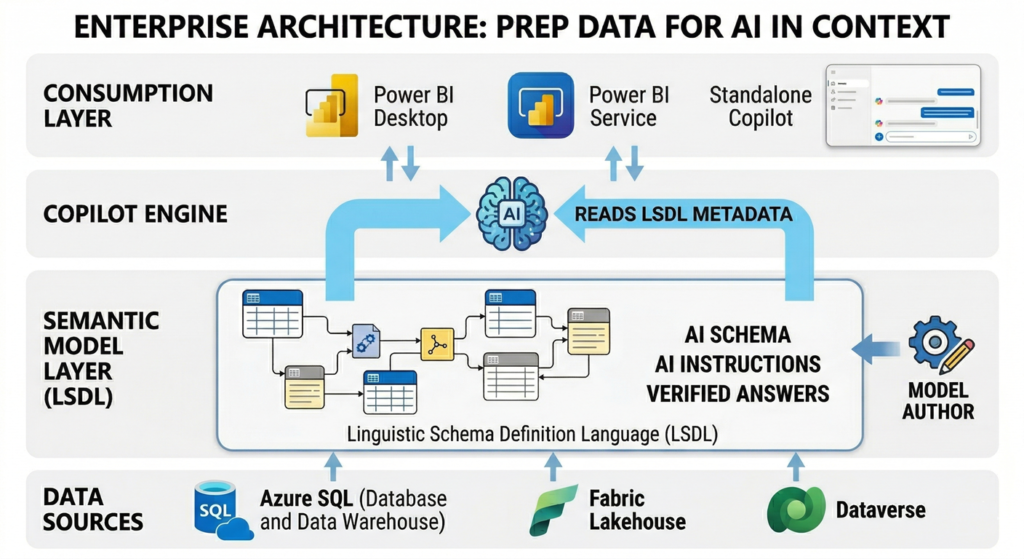
The “Prep data for AI” tooling integrates into the existing Power BI semantic model layer without requiring changes to the underlying data warehouse, lakehouse, or ETL pipelines. This is a metadata-layer enhancement, which means it carries minimal technical risk and does not alter data at rest.
How It Fits in the Enterprise BI Stack
- Data Layer: Your existing data sources (Azure SQL, Synapse, Fabric Lakehouse, Dataverse) remain untouched.
- Semantic Model Layer: AI data schemas, instructions, and verified answers are authored and stored within the LSDL (Linguistic Schema Definition Language) on the model itself.
- Copilot Layer: When users interact with Copilot, the AI engine reads the LSDL metadata to scope its reasoning, apply business context, and surface verified visuals.
- Consumption Layer: End users interact through the Copilot pane in Power BI Desktop, the Power BI service, or the standalone Copilot experience. No special client configuration is needed.
Authoring and Deployment Model
Model authors can prepare data for AI in both Power BI Desktop and the Power BI service. The workflow follows a natural author-test-publish cycle:
- Author: Configure AI schemas, write AI instructions, and set verified answers using the unified “Prep data for AI” dialog.
- Test: Use the Copilot report pane in Desktop with the skill picker to validate each capability. The HCAAT (How Copilot Arrived at This) feature provides transparency into how Copilot uses your configuration.
- Publish: Deploy the prepared model to the Power BI service. Mark the model as “Approved for Copilot” to remove friction treatments in the standalone experience.
- Govern: Use deployment pipelines and Git integration to manage LSDL changes across dev, test, and production environments.
Connection Type Support
In Power BI Desktop, the Prep data for AI features support Import, DirectQuery, and Composite (local) connection types. All model types are supported in the Power BI service. For DirectQuery and Direct Lake models deployed via Git or pipelines, a daily model refresh is required to sync LSDL changes.
Key Benefits
- Accuracy and Trust: By curating the AI data schema and embedding business-specific AI instructions, organizations reduce the risk of Copilot producing misleading or out-of-context answers. Verified answers add a further layer of guarantee for mission-critical queries. Together, these capabilities build the executive confidence needed to greenlight broader Copilot rollouts.
- Faster Adoption and Lower Training Costs: When Copilot understands your business terminology out of the box, users spend less time reformulating questions and more time acting on insights. The learning curve drops significantly because Copilot speaks the organization’s language from day one.
- Governance Without Overhead: Everything is saved on the semantic model, not scattered across reports. This centralized approach means a single team can govern AI behavior across dozens or hundreds of reports. Changes to AI instructions or schemas propagate automatically to all reports consuming that model.
- Cost Efficiency: Preparing data for AI is a metadata-only operation. There is no additional compute cost, no new infrastructure to provision, and no separate licensing required beyond existing Power BI and Copilot entitlements. The investment is purely in authoring time, which is minimal compared to the cost of poor AI adoption.
Trade-offs and Limitations
Decision-makers should be aware of the following constraints when planning their AI data preparation strategy:
- Nondeterministic AI behavior: Even with thorough preparation, Copilot does not guarantee identical outputs for the same input every time. AI instructions are guidance, not deterministic rules. Organizations should set expectations accordingly.
- Semantic model scope only: AI instructions, schemas, and verified answers are saved at the model level. Report-level or persona-level configurations are not currently supported, which limits fine-grained control for multi-audience scenarios.
- Character limits: AI instructions are capped at 10,000 characters. For complex enterprise models with extensive business logic, this may require prioritization and iteration to fit the most impactful guidance within the limit.
- Testing overhead: Each change to AI instructions requires closing and reopening the Copilot pane to see effects. This iterative testing cycle can be time-consuming for large models with many business rules.
- Regional availability: The standalone Copilot experience is not yet available in certain regions including Spain Central, Qatar, India-West, and Mexico.
- Pipeline sync requirements: For models deployed via Git or deployment pipelines, a manual model refresh in the Power BI service is required to sync LSDL changes. DirectQuery and Direct Lake models have a once-per-day refresh limitation.
When to Use vs. When NOT to Use
Use “Prep Data for AI” When:
- Your organization has deployed or is planning to deploy Copilot in Power BI at scale.
- Business users report that Copilot responses are generic, inaccurate, or lack business context.
- You have well-defined KPIs, business terminology, or analysis rules that Copilot needs to understand.
- Executive stakeholders require guaranteed accuracy for specific high-visibility queries (e.g., quarterly revenue).
- You want to govern AI behavior centrally across multiple reports built on shared semantic models.
This May NOT Be the Right Focus When:
- Your semantic models are still in early development with frequently changing schemas and business logic.
- Your organization has not yet licensed or enabled Copilot features in Power BI.
- Data quality issues at the source level (missing values, inconsistent dimensions) are the primary barrier. Fix the data foundation first.
- You need report-level or user-persona-level AI configuration, which is not yet supported.
Real-World Scenario
| A global retail organization with 200+ Power BI reports built on a centralized sales semantic model deployed Copilot across their finance and operations teams. |
Within the first month, feedback revealed a pattern: Copilot was using the wrong revenue measure when answering sales questions (referencing gross revenue instead of net revenue), did not understand the company’s fiscal calendar (which starts in April), and frequently surfaced data from deprecated product categories.
The BI team used the Prep data for AI features to address each issue:
- AI Data Schema: They restricted the schema to active product categories and key financial measures, removing legacy fields that confused Copilot.
- AI Instructions: They added business context such as “The fiscal year begins in April. When users refer to ‘this year,’ use the current fiscal year. For revenue questions, always use the net_revenue measure unless the user explicitly asks for gross.”
- Verified Answers: For the CEO’s recurring question about quarterly performance, they configured a verified answer tied to a pre-built executive dashboard visual with the correct filters and measures.
After publishing the prepared model and marking it as “Approved for Copilot,” the team saw a measurable improvement in user satisfaction scores and a reduction in Copilot-related support tickets within two weeks. Importantly, the changes required no modifications to the underlying data warehouse or ETL processes.
Final Recommendation for Decision-Makers
Deploying Copilot in Power BI without preparing your semantic models is like hiring a highly capable analyst and giving them no onboarding, no context about the business, and no guidance on which data matters. The results will be disappointing, and the investment will be questioned.
The Prep data for AI features represent a low-cost, high-impact lever that every organization should activate before scaling Copilot adoption. The work is authoring-intensive but infrastructure-light: no new services to deploy, no additional licensing, and no changes to your data layer.
Our recommended approach for enterprise rollout:
- Start with your highest-visibility semantic models — the ones executives and business leaders query most frequently.
- Assign model authors to configure AI schemas, write AI instructions, and set verified answers for critical business queries.
- Test iteratively using the Copilot pane in Desktop with HCAAT diagnostics before publishing to production.
- Mark models as “Approved for Copilot” to remove friction for end users and signal organizational readiness.
- Integrate into your DevOps workflow by managing LSDL changes through Git and deployment pipelines for consistency across environments.
The organizations that treat AI data preparation as a first-class governance activity, not an afterthought, will be the ones that realize the full promise of AI-powered business intelligence.