
Table of Contents
Executive Summary
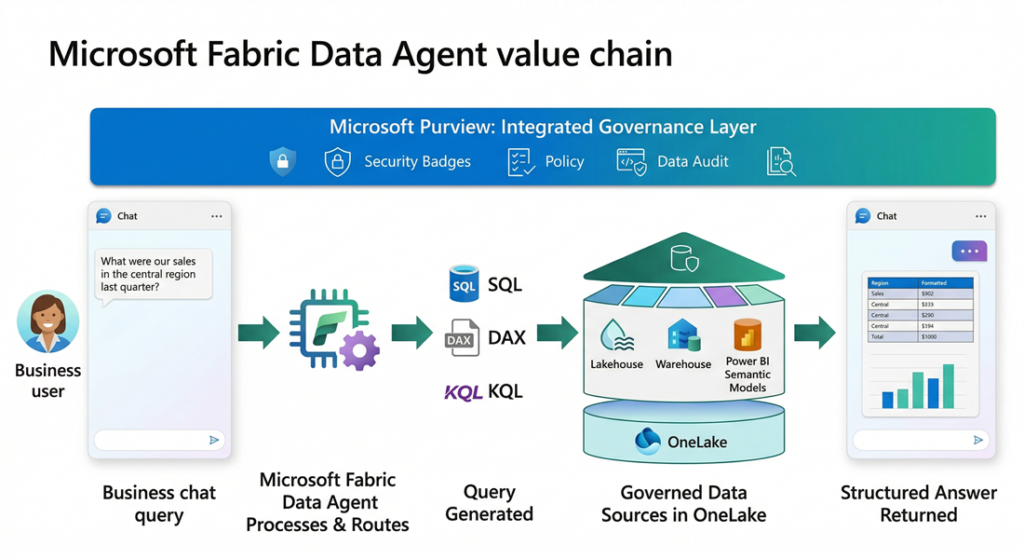
Microsoft Fabric Data Agent is a conversational AI capability within Microsoft Fabric that allows business users to query enterprise data using plain English. It translates natural-language questions into SQL, DAX, or KQL queries and executes them against governed data sources in OneLake. For decision makers, the value proposition is clear: democratize data access across the organization without compromising security, governance, or data integrity. However, adoption requires careful evaluation of data readiness, licensing costs, and the inherent limitations of generative AI in analytics.
Most enterprises sit on vast amounts of data spread across lakehouses, warehouses, Power BI semantic models, and real-time databases. Yet the people who need insights most, such as line-of-business managers, operations leads, and executives, often lack the technical skills to write SQL, DAX, or KQL queries. The result is a persistent bottleneck: every analytical question must pass through a data team, creating delays that slow decision-making.
Self-service BI tools have helped, but they still require training, dashboard familiarity, and the ability to frame questions within pre-built reports. When a question falls outside an existing dashboard, the cycle of request, build, and deliver begins again.
The Business Problem
Most enterprises sit on vast amounts of data spread across lakehouses, warehouses, Power BI semantic models, and real-time databases. Yet the people who need insights most, such as line-of-business managers, operations leads, and executives, often lack the technical skills to write SQL, DAX, or KQL queries. The result is a persistent bottleneck: every analytical question must pass through a data team, creating delays that slow decision-making.
Self-service BI tools have helped, but they still require training, dashboard familiarity, and the ability to frame questions within pre-built reports. When a question falls outside an existing dashboard, the cycle of request, build, and deliver begins again.
The core challenge is this: how do you give every stakeholder direct, secure, and governed access to organizational data without requiring them to learn query languages or wait for report development?
Solution Overview
Microsoft Fabric Data Agent is a configurable, AI-driven feature within the Microsoft Fabric Data Science workload. It sits within the broader Fabric ecosystem and leverages the following Microsoft stack components:
- Microsoft Fabric OneLake as the unified data layer across lakehouses, warehouses, KQL databases, and semantic models
- Azure OpenAI Assistant APIs as the underlying large language model (LLM) engine for question parsing, query generation, and response synthesis
- Microsoft Purview for governance, data loss prevention (DLP), access restriction policies, and compliance auditing
- Power BI Semantic Models as a queryable data source via natural language to DAX translation
- Microsoft Copilot Studio and Azure AI Foundry for extending data agents into external applications, Teams, and multi-agent orchestration workflows
Unlike Fabric Copilot, which is a preconfigured assistant embedded within Fabric workloads (notebooks, warehouse editors), the Data Agent is a standalone, highly configurable artifact. You design it, select its data sources, provide custom instructions, and publish it for consumption across the organization.
How Microsoft Fabric Data Agent Works
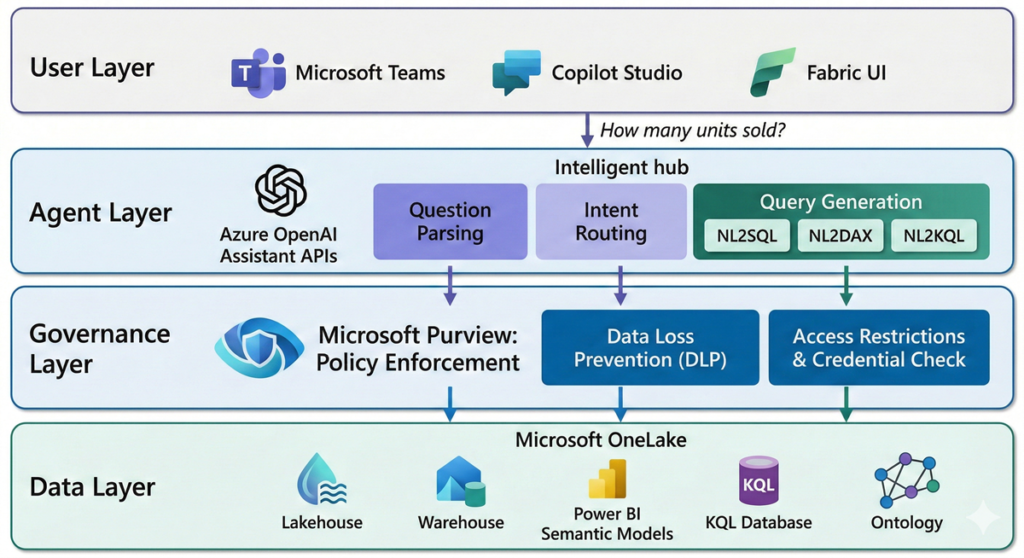
The Fabric Data Agent operates through a layered architecture that balances flexibility with governance. Understanding this architecture is critical for decision makers evaluating deployment.
Query Processing Pipeline
When a user submits a question, the Data Agent follows a structured pipeline. First, the question is parsed and validated against security protocols, responsible AI policies, and user permissions. The agent then identifies the most relevant data source from the configured set (up to five sources) and invokes the appropriate query generation tool: NL2SQL for lakehouses and warehouses, NL2DAX for Power BI semantic models, or NL2KQL for KQL databases. The generated query is validated for correctness and policy compliance before execution. Results are formatted into a structured, human-readable response.
Governance and Security Model
The Data Agent enforces read-only access across all connected data sources. It uses the requesting user’s credentials to enforce least-privilege access, meaning each interaction only reaches data that user is authorized to view. Microsoft Purview policies, including DLP and access restriction policies, are respected throughout the query lifecycle. Tenant and workspace policy settings are evaluated before any query executes.
A four-tier governance precedence model ensures organizational policies always override developer or user-level intent: Organizational intent takes highest precedence, followed by role-based intent, developer intent, and finally user intent. This means a data agent cannot be configured or prompted to bypass tenant-level restrictions.
Integration and Extensibility
Data Agents can be consumed through multiple channels. They integrate with Microsoft Copilot Studio for embedding in Teams, web apps, or line-of-business applications. Through Azure AI Foundry (formerly Foundry Agent Service), Data Agents participate in multi-agent orchestration workflows as the conversational analytics component. The Microsoft 365 Copilot integration surfaces governed insights directly within Outlook, Excel, and Teams.
Key Benefits
- Democratized Data Access: Non-technical users can ask questions in plain English and receive structured answers without writing SQL, DAX, or KQL. This reduces dependence on data teams for routine analytical queries and accelerates time-to-insight across the organization.
- Governed by Design: Unlike bolt-on AI solutions, the Data Agent inherits the full Microsoft Purview governance stack. DLP policies, sensitivity labels, access restrictions, and audit logging apply automatically. There is no separate governance layer to configure or maintain.
- Reduced Operational Overhead: By absorbing a portion of ad-hoc query requests that would otherwise go to data engineering or BI teams, the Data Agent frees up technical resources for higher-value work such as data modeling, pipeline optimization, and advanced analytics.
- Multi-Channel Reach: A single Data Agent configuration can serve users through the Fabric UI, Microsoft Teams, Copilot Studio apps, Azure AI Foundry multi-agent pipelines, and Microsoft 365 Copilot. This means one investment in agent configuration yields multiple consumption endpoints.
- Enterprise ALM Support: Data Agents support Git integration, deployment pipelines, and built-in diagnostics. This allows teams to manage agent configurations through the same DevOps practices they use for other Fabric artifacts, promoting consistency across development, test, and production environments.
Trade-offs and Limitations
Decision makers should weigh the following constraints before committing to adoption:
- Read-only access only: The Data Agent cannot create, update, or delete data. It is purely an analytics interface, not an operational tool.
- Structured data only: Unstructured data sources such as PDFs, Word documents, and text files are not supported. Data must exist in tables within lakehouses, warehouses, semantic models, or KQL databases.
- Response size limits: Outputs are capped at 25 rows and 25 columns per response. The agent is designed for conversational insights, not bulk data extraction or full dataset retrieval.
- English-only support: The agent does not currently support non-English languages, which limits global deployment scenarios.
- LLM non-determinism: As a generative AI feature, the Data Agent does not guarantee 100% accuracy. It is not suitable for use cases requiring deterministic, auditable query results.
- Capacity region alignment: The Data Agent cannot execute queries when the data source workspace capacity resides in a different region than the agent’s workspace capacity.
- Limited example queries: You can provide up to 100 example query pairs per data source, and example queries are not currently supported for Power BI semantic model sources.
- Licensing cost: Requires an F2 or higher Fabric capacity (or P1+ Premium), plus enabling of cross-geo processing and storage tenant settings.
When to Use vs. When Not to Use
| Use When | Avoid When |
| Business users need self-service access to governed data without SQL/DAX/KQL skills | You require deterministic, 100% accurate query results for regulatory or financial reporting |
| You want to reduce the volume of ad-hoc query requests to your data team | Your data is primarily unstructured (documents, images, free-text files) |
| Your data is already organized in Fabric lakehouses, warehouses, semantic models, or KQL databases | You need bulk data extraction or full dataset downloads exceeding 25 rows |
| You need a conversational analytics layer that integrates with Teams, Copilot Studio, or M365 Copilot | Your organization operates primarily in non-English languages |
| Microsoft Purview governance is already part of your data platform strategy | You need write-back capabilities or operational automation triggered by queries |
Real-World Scenario
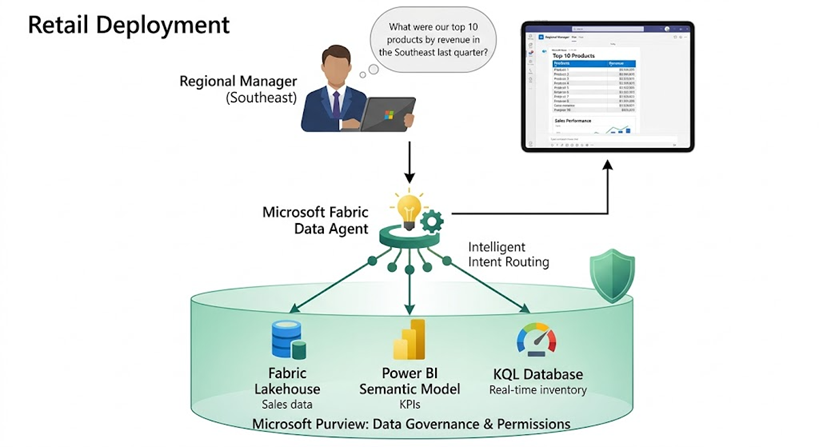
Consider a mid-size retail company with 200+ stores. Their data landscape includes a Fabric Lakehouse containing transactional sales data, a Power BI semantic model for regional performance KPIs, and a KQL database for real-time inventory monitoring.
Before the Data Agent, regional managers submitted ad-hoc data requests to the central analytics team. A question like “What were our top 10 products by revenue in the Southeast region last quarter?” took 2–3 days to fulfill through the request queue. With a configured Fabric Data Agent, that same manager opens a chat interface in Teams, types the question in plain English, and receives a structured table within seconds.
The company configured the Data Agent with three data sources, added custom instructions to route financial queries to the semantic model and inventory questions to the KQL database, and provided 50 example query pairs per source. After a two-week pilot with one region, they expanded to all regional managers. The analytics team reported a 40% reduction in ad-hoc request volume within the first month.
Final Recommendation for Decision Makers
Microsoft Fabric Data Agent represents a meaningful step forward in making enterprise data accessible through conversational AI. For organizations already invested in the Microsoft Fabric ecosystem, it is a natural extension that leverages existing governance, security, and data infrastructure.
However, this is not a deploy-and-forget solution. Success depends on three factors: data readiness (structured, well-modeled data in OneLake), thoughtful configuration (clear instructions, relevant example queries, and proper data source selection), and realistic expectations about LLM accuracy.
Recommendation:
- Start with a focused pilot: select one business unit, two to three data sources, and a defined set of common questions.
- Invest in configuration: the quality of agent instructions and example queries directly determines response accuracy. Treat this as an ongoing curation effort, not a one-time setup.
- Pair with governance: ensure Microsoft Purview DLP and access restriction policies are in place before exposing the agent broadly. The governance model is strong, but only if it is configured.
- Plan for change management: non-technical users will need guidance on how to frame effective questions, and on understanding the limitations of AI-generated responses.
- Evaluate for multi-agent potential: if your roadmap includes Azure AI Foundry or Copilot Studio workflows, the Data Agent can serve as the analytics node in a broader agentic architecture.
For organizations with mature Fabric deployments and a need to scale data access beyond the BI team, Fabric Data Agent is a compelling capability worth piloting. For those still in early Fabric adoption, focus on data consolidation and governance first. The agent will deliver far better results when it has clean, well-governed data to work with.