
Table of Contents
The Fragmented Reality Most Enterprise Security Teams Won’t Admit
Your DLP team blocks USB exports. Your Insider Risk team flags suspicious downloads. Your Information Protection team counts labeled documents and somewhere in the shadows, someone’s asking: “Can Copilot agents actually access PII in our SharePoint sites?”
Nobody knows. And that’s the problem.
Most enterprises don’t have a data security posture problem. They have a visibility problem disguised as fragmentation. Three or four tools are running independently, optimized for their own metrics, blind to each other. The CISO gets reports from DLP, separate reports from Insider Risk, another from Information Protection. Then the auditors ask for a single answer: “How much sensitive data do we have, and is it actually protected?”
The honest answer? Nobody in the organization can say with confidence.
This is where Microsoft Purview Data Security Posture Management (DSPM) changes the game.
Why This Looks Simple (But Isn’t)
DSPM isn’t a new tool. It’s a unification layer. It pulls together data protection signals from DLP, Insider Risk Management, Information Protection, and critically AI data access patterns into a single posture dashboard.
But here’s what makes this non-trivial: seeing everything doesn’t automatically mean you know what to fix.
Enterprises run asymmetrical security programs. One team has world-class DLP policies. Another has no Information Protection labels applied to anything. A third is drowning in Insider Risk alerts that don’t correlate to actual exposure. When you suddenly see all of this at once, the first reaction isn’t clarity. It’s chaos.
The hard problem isn’t aggregating the data. It’s knowing which signals matter most and which investments move the needle. DSPM starts solving this by identifying policy gaps automatically, surfacing oversharing risks, and for the first time at scale making AI-related data access visible to CISOs who had zero visibility into it before.
The Hidden Risk That’s Been Growing Quietly
For years, enterprises could compartmentalize data risk. DLP protected email exfiltration. Insider Risk caught departing employees downloading files. Sensitivity labels controlled document access. These were separate, manageable problems.
Then Copilot landed.
Now you have AI agents reading SharePoint, Teams messages, and Outlook data often with the same permissions as the user who deployed them. A Copilot agent trained on company data might expose sensitive information to the wrong audience. But DLP policies weren’t written for AI. Insider Risk doesn’t flag AI data flows. Information Protection labels don’t control what an agent learns.
DSPM closes this gap. For the first time, your CISO can ask: “Which of our sensitive data assets are accessible to Copilot agents, and is that intentional?”
If that question didn’t keep you up at night before, it should now.
The Real Problem: Unprotected Sensitive Assets
DSPM surfaces a deceptively simple metric that turns out to be the most valuable one: unprotected sensitive data.
This isn’t just encrypted or classified data. It’s assets that meet both conditions:
- They contain sensitive information types (PII, payment card data, health records, etc.) detected by classifiers or exact data match rules
- They are NOT protected by either a DLP policy that restricts exfiltration or a sensitivity label that controls access
Think about that for a moment. You have PII sitting in a SharePoint site with no DLP protection and no label. It’s visible to anyone with read access (including Copilot agents). And if someone downloads it, DLP doesn’t know. If an insider risk alert fires three weeks later, you can’t trace back why that data moved.
This is the core insight DSPM delivers: visibility into the gap between what you think is protected and what actually is.
Most enterprises discovering this metric for the first time are shocked at the number. It’s rarely zero.
How DSPM Unifies Your Security Posture
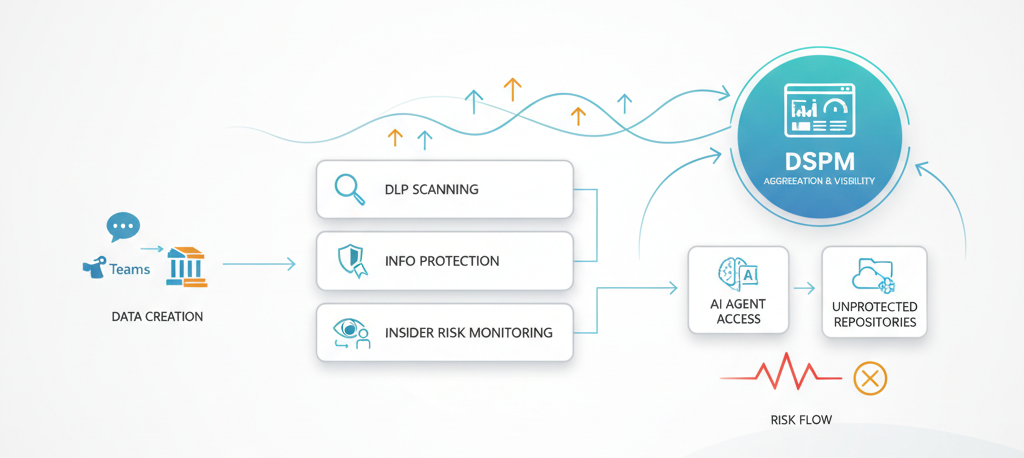
Here’s the architecture thinking: DSPM isn’t a new scanning engine. It’s an orchestration layer that sits above your existing Microsoft Purview components DLP, Insider Risk Management, Information Protection, and now AI data usage patterns and surfaces what they collectively miss.
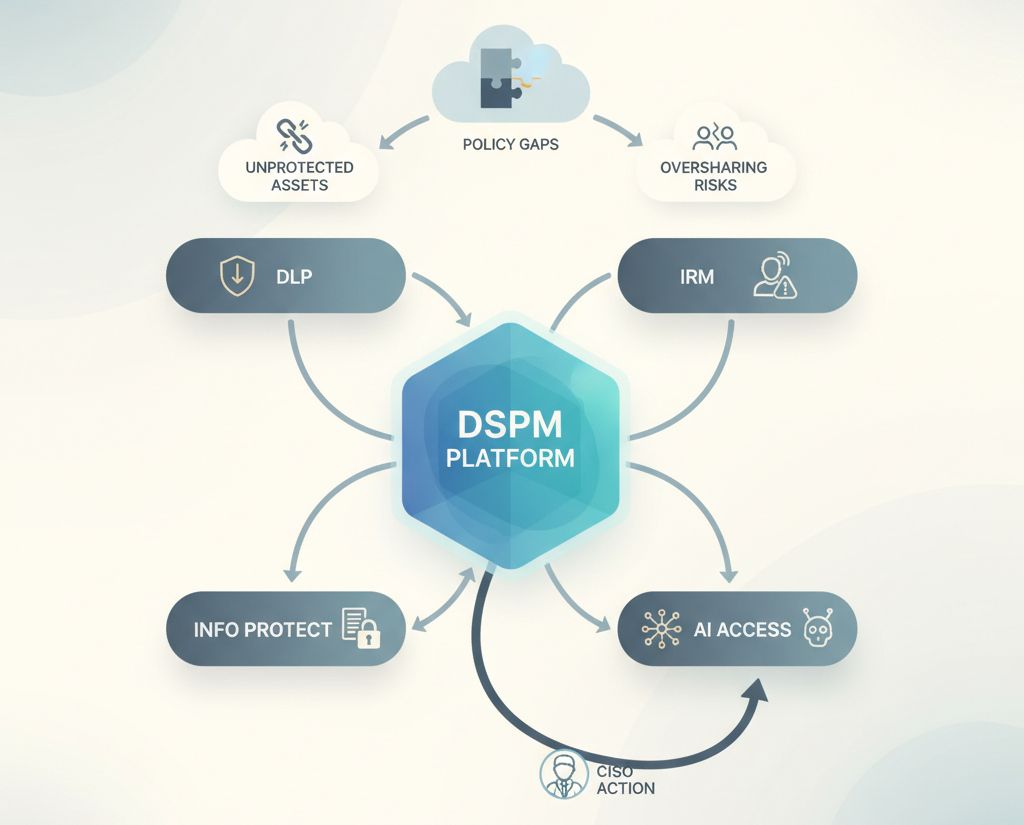
The flow works like this:
- Asset Discovery: DSPM scans Microsoft 365 (and on-premises with Purview agents) to identify data containing sensitive information types, exact data matches, or trainable classifiers.
- Policy Coverage Analysis: For each asset, DSPM checks: Is there a DLP policy blocking exfiltration? Is there a sensitivity label controlling access? If neither exists, the asset is flagged as unprotected.
- Risk Correlation: DSPM layers on signals from Insider Risk Management (user activities on unprotected assets), Information Protection usage metrics, and AI agent access logs.
- Gap Identification: The system automatically identifies patterns e.g., “80% of customer PII in SharePoint has no label,” or “Copilot agents in Finance can access health records” and recommends policies to close the gap.
- Remediation Guidance: Instead of just flagging problems, DSPM suggests specific actions: apply this sensitivity label, create a DLP rule for this data type, restrict Copilot access to this site.
This is fundamentally different from traditional security tools. You’re not managing dozens of independent policies. You’re managing a posture a holistic view of what’s protected and what isn’t.
Custom Data Risk Assessments: The Precision Layer
One of DSPM’s most powerful capabilities is custom assessments. Instead of running company-wide scans, you can target specific user groups, data sources, or risk profiles.
Real example: Your Finance team suspects oversharing of sensitive spreadsheets. You create a custom assessment scoped to Finance users and SharePoint sites. DSPM runs item-level scanning and flags every file with:
- External or anonymous sharing links
- Applied (or missing) sensitivity labels
- Owner and access details
Then you get remediation options:
- Remove the sharing link (nuclear option might break workflows)
- Apply a sensitivity label (recommended if the label blocks external sharing)
- Notify the site owner (let them decide)
- Mark as resolved (if oversharing was intentional)
This moves you from “we have a problem” to “we know exactly which 47 files are overshared and who owns them.” That’s the precision that drives real remediation.
The Trade-Off Nobody Mentions: Visibility Requires Action
Here’s the hard truth: DSPM doesn’t reduce work. It reveals work that was invisible before.
When you see that 15,000 unprotected sensitive assets exist in your SharePoint environment, you have three options:
- Fix it (requires policy creation, label strategy, potential workflow disruption)
- Accept it (document the risk, get executive sign-off, move on)
- Ignore it (continue as before, hope auditors don’t ask too hard)
Most enterprises choose option 1 initially, which means DSPM becomes a multi-quarter remediation effort. You’re not just deploying a tool. You’re fundamentally rethinking how sensitive data is classified, labeled, and protected.
Cost implications matter here. If fixing all identified gaps requires licensing Information Protection for more users or requires hiring someone to manage sensitivity label policies at scale, that’s a real investment. DSPM’s value is in making the current state visible but acting on it is up to you.
There’s also a skill requirement. DSPM assumes your organization has:
- Someone who understands DLP policy design
- Someone who can build and deploy sensitivity labels at scale
- Governance around what “protected” actually means (who decides?)
If these don’t exist in your organization, DSPM becomes a very expensive visibility tool without the operational capability to act on it.
Where This Becomes Over-Engineered
DSPM makes sense for enterprises handling regulated data or facing audit requirements. If you’re managing PII, health records, payment card data, or intellectual property, you need this visibility.
It becomes over-engineered if:
- You’re a small org with tight data governance already (5 people, everyone knows what data exists)
- You have minimal sensitive data (SaaS company with mostly public content)
- Your compliance requirements are simple (no healthcare, financial, or privacy regulation)
In these cases, a basic DLP policy + sensitivity labels might be sufficient. DSPM adds operational overhead without proportional value.
But if you’re running multiple business units, managing data across geographies, or operating under regulatory pressure (SOX, HIPAA, GDPR, CCPA), DSPM is table stakes. The visibility alone justifies the investment.
When DSPM Clicks: The Maturity Question
DSPM delivers the most value when your organization has already reached a certain security maturity level:
You have DLP policies in place (even if incomplete) You’re starting to use sensitivity labels (not perfected, but intentional) You’re tracking insider risk signals (and asking what they correlate to) You’re asking questions about AI data access (not ignoring it)
If you’re starting from zero no DLP, no labels, no policy framework DSPM won’t solve that. It will diagnose the problem very clearly, which is valuable, but the fix requires foundational work first.
For organizations already at this maturity level, DSPM accelerates decision-making. Instead of quarterly compliance reviews based on fragmented reports, you get continuous posture visibility and automated remediation recommendations.
The Real-World Scenario: Mid-Market Financial Services
Imagine a mid-market financial services firm with 2,000 employees, $500M in AUM. They have:
- DLP policies blocking credit card and account data exfiltration
- Insider Risk Management monitoring for regulatory violations
- Sensitivity labels on some (but not all) documents
- Copilot deployed across Finance and Compliance teams
- Recent audit findings: “Data classification is incomplete; oversharing is suspected”
The CISO deploys DSPM. Within 48 hours:
The unprotected sensitive assets report shows:
- 3,200 files containing PII with no sensitivity label and no DLP coverage
- Of those, 850 have external sharing links
- 340 are accessible to Copilot agents trained on company documents
The policy gap analysis reveals:
- No DLP policies for health insurance data (they’re regulated under privacy rules but assumed it was covered)
- No labels on vendor lists (considered “internal” but actually contains negotiation leverage)
- Copilot access policies don’t align with data classification
The remediation roadmap becomes clear:
Month 1-2: Apply sensitivity labels to high-risk unprotected assets, revoke external sharing links on critical files
Month 3-4: Create DLP rules for previously uncovered data types, restrict Copilot agent access where labels indicate confidentiality
Month 5+: Ongoing monitoring, policy refinement, incident response integration
Without DSPM, this discovery happens during an audit. With DSPM, they’re proactive. That difference is worth millions in avoided incidents and remediation costs.
The Architecture Thinking: Why Unification Matters
Traditional security tools are point solutions. DLP stops exfiltration. Insider Risk catches departing employees. Information Protection encrypts documents. Each solves one problem independently.
But in reality, data risk is a system. A departing employee (Insider Risk signal) exfiltrating customer data (DLP miss) because it wasn’t labeled (Information Protection gap) to a Copilot agent trained on unprotected repositories (AI risk) = incident.
DSPM doesn’t prevent this. But it makes the system visible. You can see:
- Which unprotected assets create the most risk
- Which data types are consistently falling through the cracks
- Which user behaviors correlate with exposure
- Which Copilot deployments have access to sensitive data they shouldn’t
This isn’t about adding complexity. It’s about seeing the complexity that already exists so you can simplify it intentionally.
Business Impact: What Changes When DSPM is Running
Audit readiness: Instead of scrambling when auditors ask, “How much sensitive data do you have?”, you have a real-time answer with evidence.
Incident response speed: When a data breach is discovered, you already know which assets were at risk, which policies should have caught it, and why they didn’t. Root cause analysis moves from weeks to hours.
Compliance confidence: Compliance teams move from reactive (we’ll label this because we got an audit finding) to proactive (we see the gap and we’re fixing it before the auditor sees it).
Risk quantification: “We have 2,300 unprotected sensitive assets” is a real business metric that drives budget decisions.
AI governance: For the first time, CISOs can say: “Our Copilot agents can access these data sources, and we’ve validated that’s appropriate.” That’s non-trivial when regulators are asking questions about AI data usage.
The CISO’s Real Question: Do We Actually Need This?
If your CISO is asking for unified visibility into data security posture a single dashboard instead of four separate reports, then yes.
If your organization is:
- Running Copilot at scale and hasn’t validated data access controls
- Facing audit requirements around data protection
- Managing sensitive data across multiple teams/geographies
- Building an AI-first strategy and need to understand data risk implications
Then DSPM isn’t optional. It’s foundational governance for the AI era.
If you’re a small org with tight controls and minimal sensitive data, you might not need it yet. But the question will come eventually.
The Hard Recommendation: Start with a Pilot, Not a Bang
DSPM works best as a phased rollout:
Phase 1 (Weeks 1-4): Deploy DSPM in read-only mode, run custom assessments on high-risk data sources, identify unprotected sensitive assets. Goal: Get real numbers, understand the current state.
Phase 2 (Months 2-3): Address the top 20% of findings (the 80/20 rule applies fix the worst oversharing, the biggest policy gaps). Prove that remediation works.
Phase 3 (Months 4+): Scale remediation, integrate DSPM insights into ongoing compliance/security operations, feed findings into Insider Risk and DLP policy refinement.
Don’t try to fix everything at once. You’ll exhaust your team and create policy conflicts. Use DSPM to see what matters most, fix that first, then iterate.
The Final Take: Data Security Posture is Now Measurable
For years, CISOs have run data security programs in the dark. They inherited DLP policies, deployed Information Protection labels, monitored insider risk, and crossed their fingers that it all worked together. It rarely did.
DSPM doesn’t solve data security for you. But it makes it measurable and manageable for the first time.
You can see exactly what’s protected and what isn’t. You can quantify the gap. You can prioritize remediation by actual risk, not politics. And critically, you can validate that your Copilot deployments aren’t creating data access problems you didn’t anticipate.
In the AI era, where agents read your data and make decisions based on it, that visibility isn’t nice to have. It’s essential.
The question isn’t whether DSPM solves your data security problems. The question is whether you can afford not to know what problems actually exist.