
Table of Contents
You’ve probably seen it in your audit logs. A permission you’ve never granted. A privilege that doesn’t appear in any documentation you’ve read. And yet, your external data partners keep asking why they can’t access Databricks tables from their applications.
That’s EXTERNAL USE SCHEMA. And if you’re managing data governance at scale, understanding this privilege isn’t optional. It’s the difference between enabling external analytics and locking down data completely.
The Permission That Breaks ALL PRIVILEGES
Here’s what makes EXTERNAL USE SCHEMA genuinely weird: it’s deliberately excluded from the ALL PRIVILEGES grant.
Think about that for a moment. When you grant ALL PRIVILEGES on a schema to a user, they get everything – CREATE TABLE, SELECT, MODIFY, DELETE. Everything. Except this one thing. This isn’t an oversight. It’s architectural intent.
EXTERNAL USE SCHEMA exists specifically to prevent accidental data exfiltration. It’s the gatekeeping mechanism that says: you can own data inside Databricks, but only I decide who gets to read it from outside Databricks. Schema owners don’t have it by default. Catalog owners can’t just inherit it. There’s no role that comes pre-loaded with this privilege.
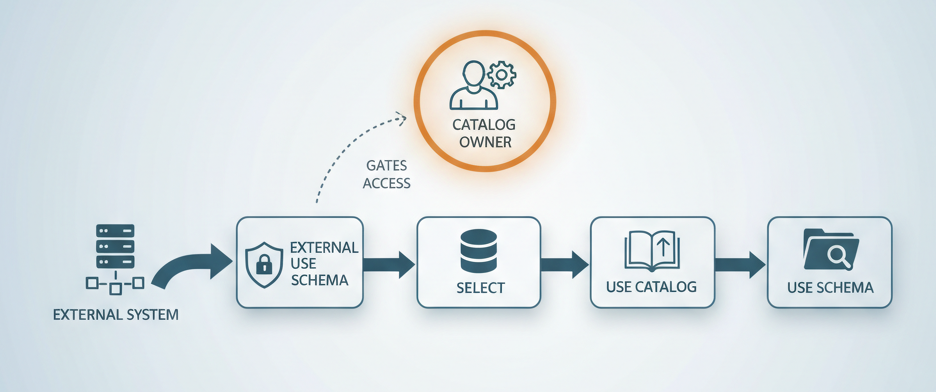
Only one person in your organization can grant it: the catalog owner. This design choice forces a conversation that most teams skip. Instead of flipping a switch that enables broad external access, you’re creating an explicit gate. You’re asking: should this external application actually be able to read from this schema? The answer requires a human decision, not a template or automation.
Why This Matters More Than You Think
External access to Databricks data isn’t new. Partners, customers, and adjacent systems have needed it for years. But the way Unity Catalog manages it reveals something important about how Databricks thinks about governance at scale.
Consider the typical scenario: You’ve built a data mesh. Different teams own their catalogs. You want external analytics platforms, third-party tools, or customer-facing APIs to read from these catalogs. So you set up a service principal. You grant it permissions. And then… it fails.
Not because the service principal is misconfigured. Not because of network issues. But because nobody granted EXTERNAL USE SCHEMA, and therefore the external system has no legal right to access the schema regardless of what table-level permissions exist.
This happens because external access through Iceberg REST catalog or Unity REST API requires a complete permission chain: EXTERNAL USE SCHEMA on the schema, SELECT on the table, USE CATALOG on the parent catalog, and USE SCHEMA on the parent schema. Miss one link, and the entire chain breaks.
The external system doesn’t just need read permission. It needs to prove that the catalog owner explicitly approved external access to this data.
The Architecture Behind the Gatekeeping
Databricks supports two external access patterns, and both require this privilege:
Iceberg REST Catalog gives external engines read and write access to Iceberg tables. This is for analytics platforms, ETL tools, and AI/ML systems that need to query or update governed data outside the workspace.
Unity REST API provides read access through a more controlled interface. Simpler, more restrictive, better for customer-facing applications and cross-cloud scenarios.
Both depend on credential vending, external clients authenticate (OAuth or personal access tokens) and inherit the privileges of the authenticated principal. So, if your service principal has the right permissions, the external system gets them too. If it doesn’t, external access fails cleanly.
This is actually elegant. You’re not creating separate credentials or managing a web of trust. You’re extending workspace identity outward.
But it only works if the catalog owner explicitly decided to allow it.
The Metastore-Level Switch (And Why It Matters)
Before any of this works, external data access must be enabled at the metastore level. It’s disabled by default. This is another gating mechanism. Before schema owners even see the EXTERNAL USE SCHEMA privilege as an option, a metastore admin must flip a global switch that says: external systems are allowed to access this metastore’s data at all.
That decision can’t be delegated. It can’t be inherited. It has to be conscious and deliberate.
For organizations managing multiple metastores across regions, cost centers, or data residency boundaries, this becomes a critical control point. You can set external access policies per metastore without affecting others. You can keep one metastore completely isolated while opening another to vetted partners.
Most teams discover this feature exists only when troubleshooting why external access isn’t working. “Why can’t my partner read this data?” becomes “Oh, we need to enable external access at the metastore level first.”
Companion Privilege: EXTERNAL USE LOCATION
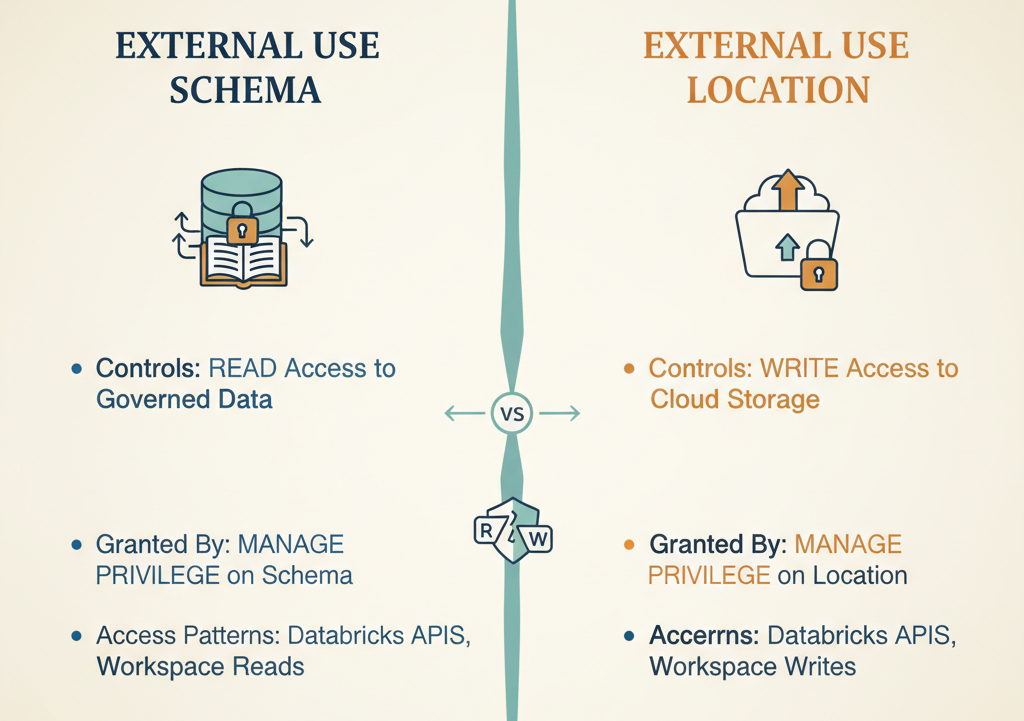
EXTERNAL USE SCHEMA has a sibling that works the same way: EXTERNAL USE LOCATION.
If EXTERNAL USE SCHEMA gates read access to governed data in the catalog, EXTERNAL USE LOCATION gates write access to cloud storage locations (S3, ADLS, GCS). It’s also excluded from ALL PRIVILEGES. It’s also only grantable by the user with MANAGE privilege on the external location.
Why separate privileges? Because external writes are higher-risk than external reads. Reading data leaks information. Writing data can corrupt it, delete it, or incur cost surprises. These shouldn’t be tied together.
This matters if you’re building data pipelines where external systems need to write results back into cloud storage managed by your data platform. You’ll need to explicitly grant both privileges, and you’ll do it separately, for separate reasons.
The Critical Implementation Detail Nobody Gets Right
Here’s the operational pitfall that catches most teams: the workspace URL used for REST API endpoints MUST include the workspace ID.
Use a URL without the workspace ID, and you’ll get a 303 redirect to the login page instead of API results. Your external system will think it’s a permissions error. Your support team will spend hours debugging. The fix is one line in a config file.
This matters because external clients often build connectors or SDKs that abstract away the workspace URL. If that abstraction doesn’t include the workspace ID, external access silently fails. Authentication looks broken. Permissions look broken. Neither is the actual problem.
Also worth knowing: Unity Catalog governs reads and writes performed through Databricks APIs and the workspace. It does NOT govern direct reads and writes against cloud storage. If an external system authenticates directly to S3 or ADLS with its own credentials, Unity Catalog doesn’t see it. This is both a feature (performance, simplicity) and a risk (audit trail, governance). Understanding which data your external systems are reading through Databricks vs. reading directly from cloud storage is crucial for governance.
Who Actually Needs This Privilege?
- Service principals for third-party analytics tools that need to federate Databricks tables into their own platforms
- Cross-workspace integrations where one workspace needs to read catalogs managed by another workspace
- Customer-facing APIs that expose Databricks data through external endpoints
- Partner data sharing scenarios where you want governed, auditable access without copying data
- ETL orchestrators running outside Databricks that need to write back results to tables
If none of these describe your use case, you probably don’t need EXTERNAL USE SCHEMA at all. And that’s fine. Most organizations run internal-only data stacks.
But if your architecture looks like a hub with spokes at Databricks at the center, with external systems reading and writing at the edges, this privilege becomes a critical control point.
The Decision You Need to Make
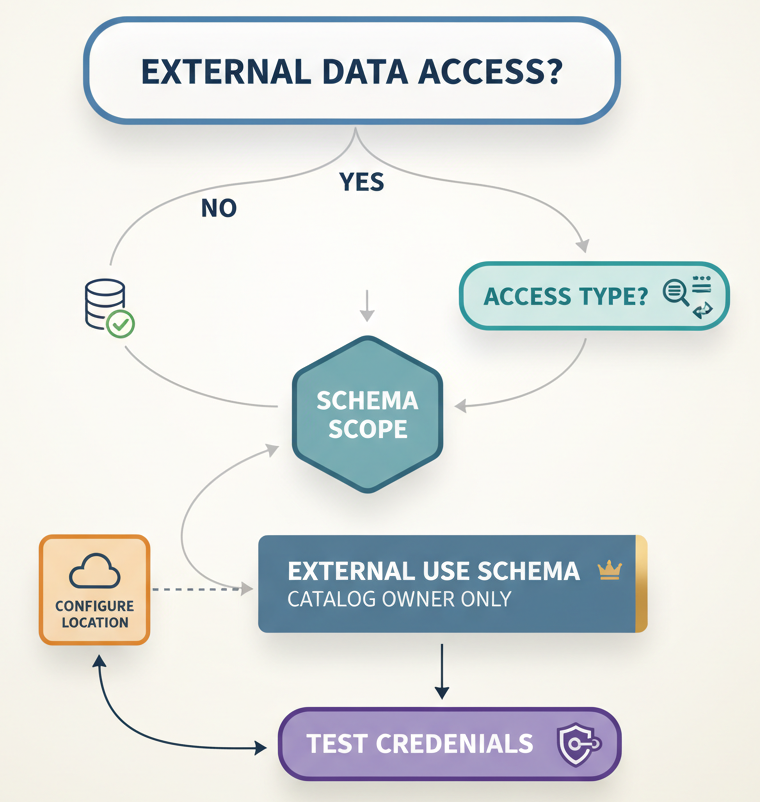
Here’s what you need to decide: Should we enable external access at all? If yes: Which external systems, and which catalogs/schemas?
These questions matter because they force explicit governance. You can’t accidentally leak data through external REST APIs if you’ve thought through which systems should have that access. Most teams approach this backwards. They build the architecture first and discover the privilege requirement during troubleshooting. Then they scramble to retrofit governance.
Better approach: Start with the governance model. Decide which external systems are allowed, which schemas they access, what they do with the data, and how you’ll audit it. Then set up EXTERNAL USE SCHEMA to match that model.
The Anti-Exfiltration Posture
All of this, the deliberate exclusion from ALL PRIVILEGES, the metastore-level kill switch, the separation of EXTERNAL USE SCHEMA and EXTERNAL USE LOCATION, the requirement for catalog owner approval reflects a specific security philosophy.
Databricks is betting that exfiltration (moving data outside the platform without authorization) is a bigger risk than convenience. So they’ve made external access slightly inconvenient. You have to make an explicit choice. You have to involve the person who owns the data. This frustrates some teams initially. It adds a step. It requires communication between the person who owns the catalog and the person who owns the external system integration. But that friction is the point. It’s security through intentionality.
What Happens Next
External data access through Unity Catalog will likely expand. Databricks is investing heavily in REST APIs, Iceberg compatibility across tools, and credential vending. The trend is clearly toward more external ecosystems reading and writing governed data.
But the permission model won’t change. EXTERNAL USE SCHEMA will remain deliberately hard to grant, because exfiltration prevention is non-negotiable.
So, the real question isn’t whether to understand this privilege. It’s whether you want to understand it now deliberately, through documentation or later, through troubleshooting and frustration.
The catalog owners in your organization are probably going to get this question. Better if they know the answer.
Key Takeaway: EXTERNAL USE SCHEMA is excluded from ALL PRIVILEGES by design. It’s the permission that prevents accidental data exfiltration through external APIs and REST catalogs. Only catalog owners can grant it. If external systems can’t access your data, this is probably why.