
Table of Contents
When did your last audit reveal a data issue nobody could trace? That moment when compliance ask’s “who changed this value and when?” is when teams realize they either have an audit trail or they don’t. There’s no middle ground.
Delta Lake’s Change Data Feed (CDF) and Row Tracking promise to solve this problem. They capture every row-level change, maintain immutable histories, and enable granular-level visibility. But here’s what enterprises rarely discuss: they add storage overhead. Real overhead. The kind that makes CFOs squint at cloud bills.
This post isn’t about features. It’s about choosing the right combination of Delta Lake’s audit capabilities and knowing exactly what that choice costs your infrastructure.
The Audit Problem Nobody Wants to Admit
Most data platforms treat changes like they disappear. INSERT, UPDATE, DELETE and hence done. Move on. The data’s there, the transaction completed, but the change itself? Gone forever.
In regulated industries, that’s unacceptable. Financial services need to prove every rate change, every balance adjustment, every transfer. Healthcare systems must audit medication modifications. SaaS platforms need to prove data lineage for GDPR requests. Manufacturing tracks component lot changes for traceability.
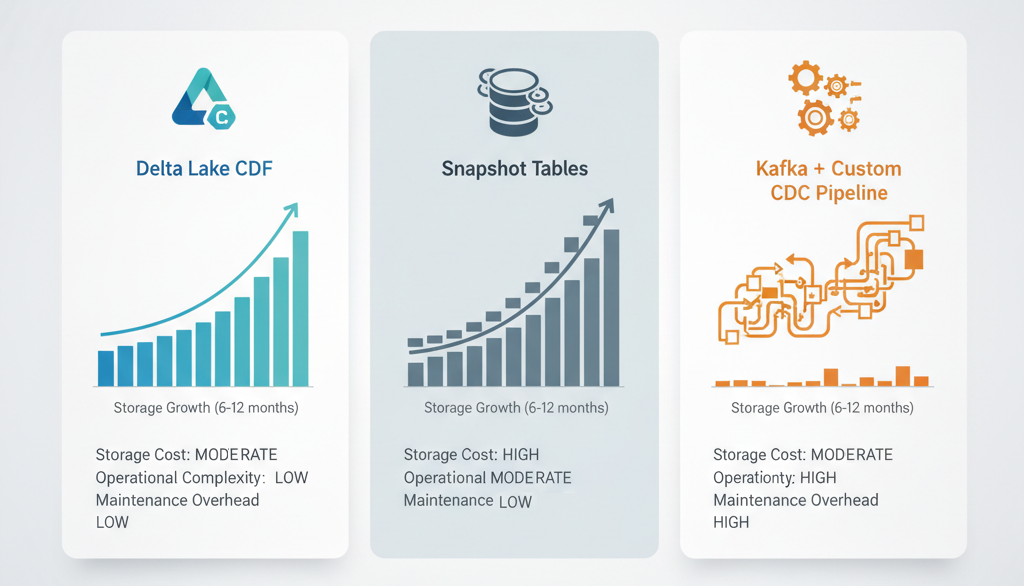
Traditional approaches are painful. Snapshot tables (dumping entire tables daily) consume massive storage. Application-level logging scatters change data across logs, databases, message queues are impossible to reconcile. Version tables multiply complexity exponentially.
Delta Lake offers something different. You get a native, transactional change capture mechanism built into the storage layer. But “built-in” doesn’t mean “free.”
What Change Data Feed Actually Captures (And Costs)
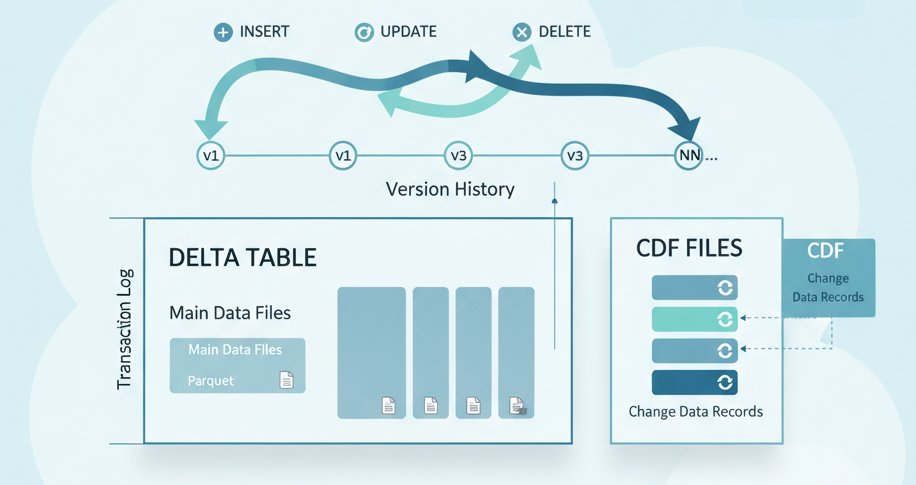
Change Data Feed works like this: every transaction writes additional change files alongside your regular data files. These files capture what changed inserts, updates, deletes as separate records with metadata showing the operation type and the Delta version where the change occurred.
The key word: separate files. This means CDF storage overhead isn’t negligible.
Think about a customer table with 500 million rows. Most days, 1% changes. That’s 5 million row-level operations becoming separate CDF records. These don’t replace your main table; they exist alongside it. Your storage doubles. Your query complexity increases. Your maintenance windows lengthen.
But here’s why you enable it anyway: Time travel queries alone let you ask “what did this customer record look like on March 15?” without keeping snapshots. Delta’s ACID guarantee means every change is transactional. Rollback any transaction atomically. No corrupted intermediate states.
And when an auditor asks for proof of changes? You have it, timestamped and immutable, captured at the storage layer not reconstructed from application logs or guessed from backups.
Row Tracking: The Secret Identity Every Row Needs
Now consider this scenario: you run OPTIMIZE to compact your data files. Or Z-ORDER to cluster data for performance. These operations restructure files, merge small ones, reorganize content. The data is the same logically but the physical storage location changes.
Without Row Tracking, linking a change to a specific row becomes a guessing game. You know the row changed, but if the row’s been moved between files during maintenance, tracking which specific row becomes fragile.
Row Tracking assigns stable, unique identifiers to individual rows. These identifiers persist across OPTIMIZE, Z-ORDER, and other maintenance operations. When a row changes, its identifier stays constant. When you rebuild your table layout for performance, Row Tracking goes with it.
The tradeoff? Row Tracking adds metadata columns to every row. It’s not a separate file layer like CDF. It’s baked into every record. This overhead is smaller than CDF, but it’s real. Every row now carries additional attributes.
Decision point: Enable Row Tracking on tables where change lineage matters. Skip it on high-churn analytical tables where you’re computing aggregates, not tracking individual changes. You don’t need perfect row identity to know “daily revenue increased,” only to answer “which customer’s invoice was modified and when?”
The Cost Calculation Nobody Wants to Do
Let’s make this concrete.
Assume you have:
- 100 GB of operational data in Delta tables
- 5% of rows change daily (data churn rate)
- 6-month audit retention requirement
- Azure Databricks on-demand storage at ~$4/TB/month
Without CDF:
- 100 GB base storage cost: ~$0.40/month
With CDF enabled for 6 months:
- Base table: 100 GB × 6 months = 600 GB
- Change files: (100 GB × 5% daily churn × 180 days) ≈ 2.7 TB
- Total: ~3.3 TB stored
- Cost: ~$13.20/month
The math scales. At 200 GB, you’re $26+ monthly. At 1 TB, you’re exceeding $100 monthly. For a large enterprise running hundreds of tables, CDF storage becomes a significant line item.
Add Row Tracking overhead (roughly 2-3% per row), and that 3.3 TB grows to 3.4+ TB.
But weigh that against alternatives:
- Kafka + custom change capture: Someone owns the pipeline. Forever.
- Application-level logging: Distributed, inconsistent, expensive to reconcile.
- Nightly snapshots: Same storage cost, worse query latency, no granular change visibility.
CDF is often the cheapest option when you factor in operational burden.
Enabling CDF Retroactively? Not Happening
Here’s a painful lesson: CDF only captures changes after you enable it. No historical retroactivity. If you enable CDF today, you cannot query changes from yesterday, last week, or last month.
This matters more than it should. Teams enable CDF, assume they have historical audit data, then discover compliance needs three months of prior audit trail. Too late.
Plan backward. Decide now if audit retention is a requirement. If yes, enable CDF before production load. If you’re already running, either accept that the audit trail starts today, or rebuild tables with retroactive initialization, expensive and time-consuming.
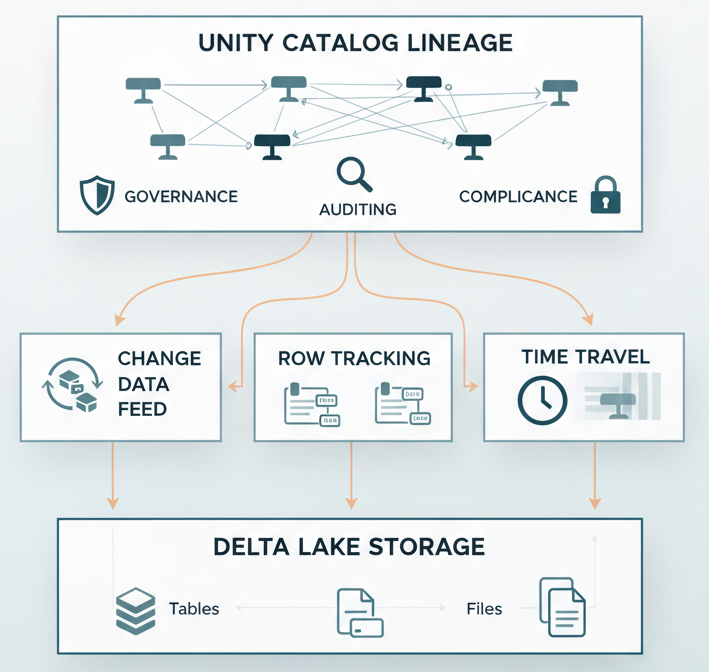
For Unity Catalog users, there’s an additional advantage: catalog-level lineage tracking shows how data transforms across tables, who accessed what, when. This complements CDF nicely. CDF shows what changed, lineage shows where it flowed.
When to Enable, When to Skip
Enable Change Data Feed when:
- Regulatory or compliance requirements demand change auditing (financial, healthcare, SaaS)
- You need forensic-level change investigation beyond “current state”
- Your data supports billing, rate calculations, or customer-visible features where change history is essential
- You’re willing to trade storage cost for operational simplicity
Enable Row Tracking when:
- CDF is enabled and you need stable row identity across OPTIMIZE/Z-ORDER cycles
- You’re performing complex change analysis where distinguishing between updates and delete-then-reinsert matters
- Your maintenance schedule is aggressive (frequent optimization passes)
Skip both when:
- You’re building dimensional analytics (fact tables, dimension tables for reporting)
- Churn rate is extremely high and retention windows are short
- Compliance requirements don’t exist for the specific dataset
- You’re optimizing purely for query performance and don’t need audit trails
The Operational Reality: Maintenance Matters
Enabling CDF doesn’t finish the conversation. Now you need a maintenance strategy.
Delta Lake tables accumulate small files if you don’t OPTIMIZE periodically. This degrades query performance, more files to scan means more I/O, higher latency. But OPTIMIZE removes old file versions, which can delete historical change data if you’re not careful.
Best practice: Set retention windows explicitly. VACUUM old files after your audit retention period expires. OPTIMIZE to compact layouts. Let Delta handle version cleanup while preserving the change history you need.
For high-transaction-volume tables, consider Merge operations. Delta’s low-shuffle merge on Azure Databricks minimizes data movement, which is critical when CDF is enabled because you want to minimize write amplification.
The question every architect should ask: “Can we OPTIMIZE this table weekly, or does our audit retention window require daily VACUUM skips?” The answer determines your storage footprint.
Building the Right Audit Architecture
Here’s the truth: CDF and Row Tracking aren’t silver bullets. They’re precision tools for specific problems.
If you’re running a data warehouse, you probably don’t need CDF on every table. Dimension tables? No. Fact tables? Maybe. Operational tables in your Lakehouse that feed business logic? Absolutely.
If you’re running a SaaS platform or financial system where every transaction is auditable, CDF is nearly mandatory, the storage cost is just the price of doing business.
The real decision isn’t “Should we enable CDF?” It’s “Which tables need complete change visibility, and for how long?” Answer that, size your retention window, run the storage math, and build accordingly.
Combine CDF with Delta’s time travel capabilities, and you get true transaction-level forensics. Combine it with Structured Streaming patterns and custom foreachBatch sinks, and you can route changes to external audit systems in real-time. Pair it with Unity Catalog lineage tracking, and you know not just what changed, but where it came from and where it went.
That’s an enterprise audit trail.
The Bottom Line
Change Data Feed and Row Tracking solve a real problem: enterprises need to prove what happened to their data. Delta Lake delivers that capability natively, atomically, and with strong consistency guarantees.
The cost is storage overhead and operational discipline. Neither is trivial, but both are manageable with intentional architecture decisions.
Start with the audit requirements. Work backward to the storage model. Size it honestly. Then decide: Is the cost of truth worth the cost of storage?
For most regulated enterprises, the answer is yes.